
Define
Set goals that your whole
team actually agrees on.
Most OKR cycles start with one leader writing goals in isolation and the rest of the team nodding along. Define replaces that with genuine collaborative alignment — AI-assisted goal writing, a collaborative studio where every voice is heard, built-in timers and structured escalation so you reach decisions rather than endless discussion.
The first step in the DEEP AI Framework. Where strategy becomes shared commitment rather than a document one leader wrote and everyone else received.
Define features
From blank page to aligned goals
— without the usual three weeks of back-and-forth.
Two tools work together in the Define stage: the AI Co-pilot that helps you write better OKRs, and OKR Studio where the team aligns on them together.
Start with the AI. Refine with your team.
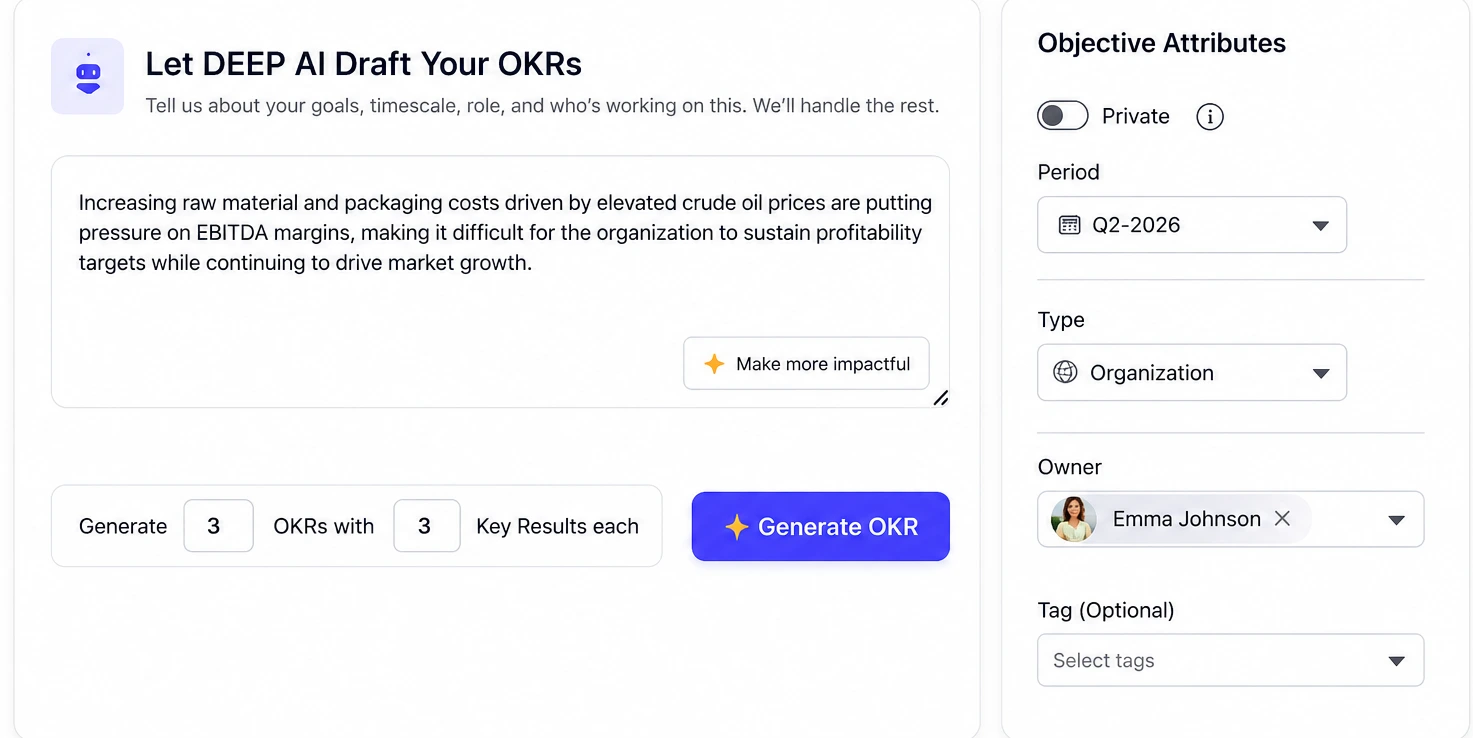
The DEEP AI Co-pilot takes your strategic context — role, business priorities, last quarter's performance — and drafts well-formed Objectives and Key Results that follow the FACTS framework. Not a template. Not a fill-in-the-blank form. A genuinely intelligent first draft that your team can debate, refine and own.
- AI drafts Objectives and KRs from your strategic context and role
- Each draft is scored for ambition, outcome linkage and clarity before it is published
- Specific improvement suggestions — not generic feedback — on every flagged OKR
- Co-pilot output can be sent directly to OKR Studio for team review and alignment
The room where your strategy gets agreed, not just announced.
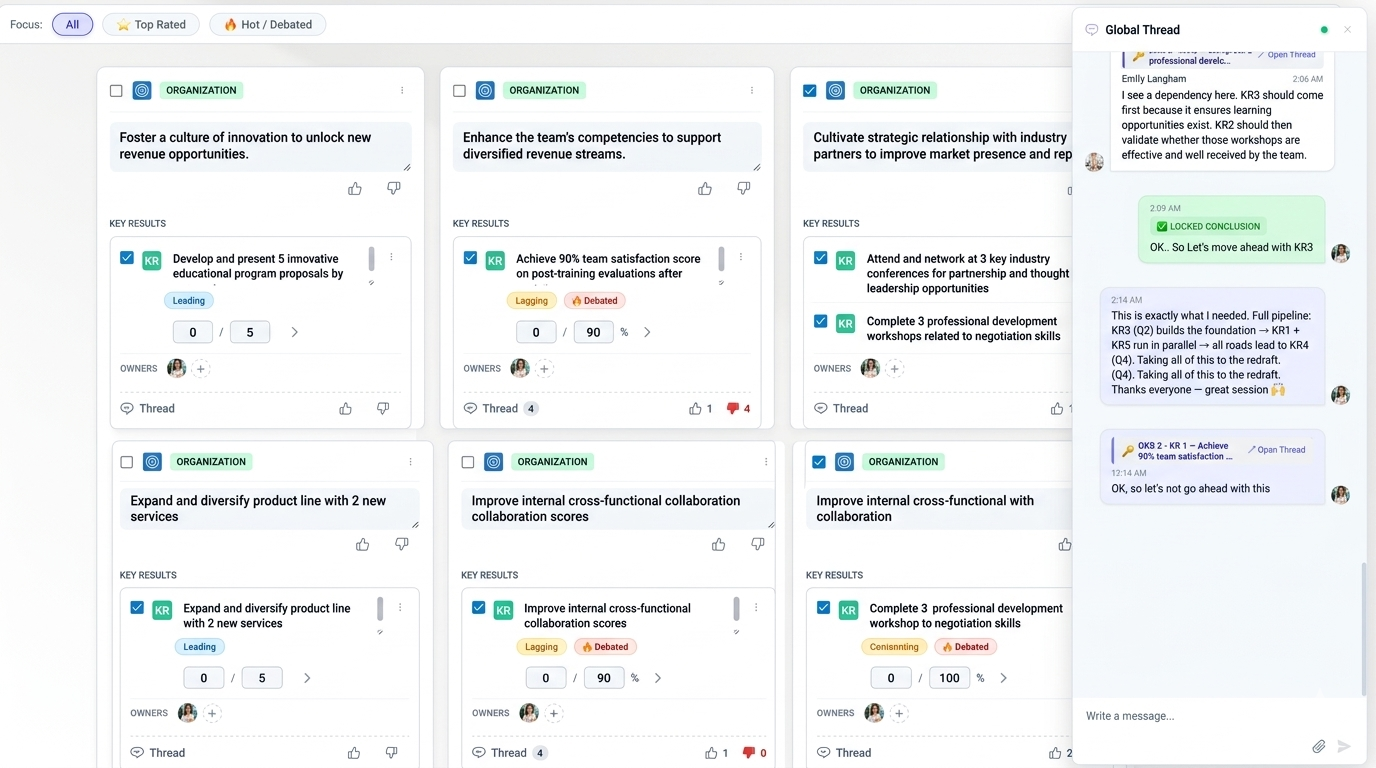
OKR Studio is a structured collaborative whiteboard where leaders bring proposed OKRs and the team brings their perspectives. Unlike a meeting where the loudest voice wins, Studio is designed to surface genuine consensus — through structured voting, threaded debate and a facilitation system that ensures decisions get made within the time you have allocated.
- Leader creates a session, shares the link, and the team joins in real time
- Proposed OKRs displayed to all participants simultaneously — no sequential presentation
- Drives genuine collaboration rather than passive approval of pre-decided goals
- Session output published directly into the OKR cycle — no rework required

Every voice counted. Not just the loudest one.
Every participant in an OKR Studio session can upvote or downvote any proposed Objective or Key Result. The aggregate vote is visible to all in real time — surfacing genuine team sentiment about each goal rather than polite silence or private disagreement that surfaces only after the cycle begins.
- One vote per participant per OKR — no vote stuffing, clear signal per person
- Vote results visible in real time as a percentage and a visual bar
- Low-vote OKRs automatically flagged for further discussion before the session closes
- OKR Champion can see vote distribution across all proposed goals before finalising

Debate attached to the goal, not scattered across messages.
OKR Studio supports two types of thread. Objective-level and KR-level threads let participants comment directly on a specific goal — questioning the ambition, clarifying the metric, or proposing a revision. The universal session thread captures cross-cutting discussion that affects multiple OKRs simultaneously. Everything stays in one place, visible to all participants, forever attached to the goal it relates to.
- Thread per Objective — discussion about the goal's strategic relevance and ambition
- Thread per Key Result — debate on the metric, target and measurement method
- Universal session thread — for discussion that spans multiple OKRs
- All thread history preserved and visible after the session closes — full context retained
Time-boxed debate. Guaranteed decisions.
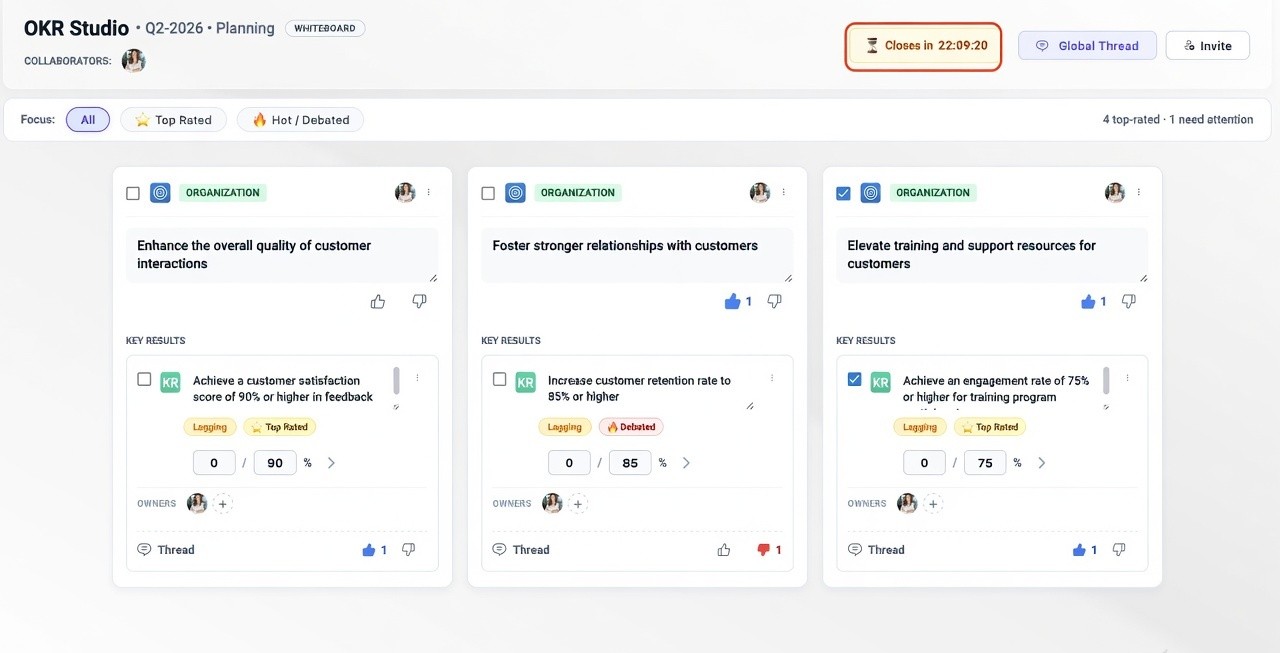
Alignment sessions without a time structure drift into unresolved debate. The OKR Studio facilitator sets a session timer that is visible to every participant — creating natural urgency and keeping discussions focused. If the team cannot reach consensus on an OKR before the timer expires, the system automatically notifies the designated Department Head and OKR Champion and brings them into the session to provide a final decision. Goals get agreed. Every time.
- Session timer set by the facilitator and visible to all participants in real time
- Per-OKR timers available for granular time-boxing of individual goal debates
- On expiry with unresolved OKRs — automatic notification to Dept Head and OKR Champion
- Dept Head and OKR Champion join the session directly to make the final call
- Escalation log preserved — every escalated decision is recorded with context
Every goal connected. Every dependency named.
Once OKRs are agreed in Studio, Define establishes the structural connections that make the cascade work. Objectives are linked from company level to division to team to individual. Dependencies between teams — OKRs that require another team's input or delivery to succeed — are mapped explicitly so they are visible from day one rather than discovered when execution stalls.
- Visual alignment tree showing cascade from company strategy to individual OKR
- Cross-team dependency mapping — mark which OKRs depend on another team's delivery
- Dependency owners assigned at the Define stage — not discovered mid-cycle
- Nexus AI reads the dependency map to surface cascade health throughout the quarter

▶ Execute — Turn aligned goals into daily action
Task Coach, KR linkage, check-ins and the continuous review cycle
