
Help center > Roles & Permissions > User Roles & Associated Permissions
User Roles & Associated Permissions
Organization Settings, Add/Manage Teams, Periods, Projects & Reports
Worxmate OKR software platform offers three user roles and permissions to support effective implementation of OKRs. All the Roles can have associated role type of Team Manager or Line Manager.
Here are the common user roles and permissions:
Admin: The Admin role has full access to all features and functionality of the platform, including creating and managing users, setting up teams, departments, and OKRs. They can also customize the platform settings and permissions for different user roles.
Super User: The Super User role can create, edit, align, and manage their own objectives. They can also add Teams, Projects and access reports.
Basic User: The Basic User role can create (for all user types) but edit, align, and manage their own objectives.
Team Manager: The Team Manager role can create, edit, and manage objectives and key results for their team members.
Line Manager: The Individual Manager role can create, edit, and manage objectives and key results for their direct reports.
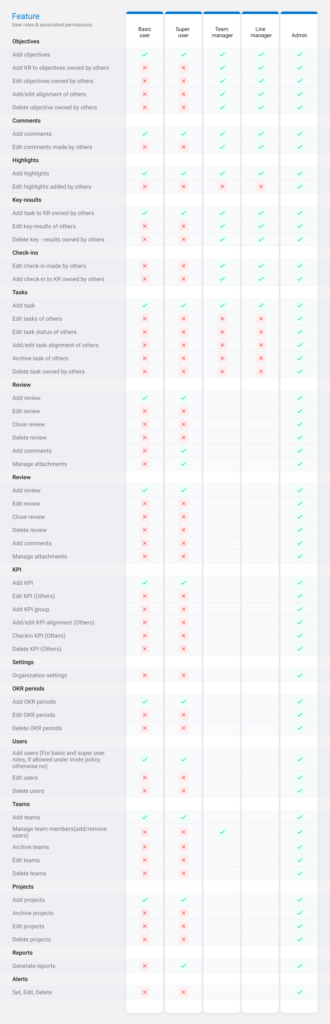
Follow our article on Different Roles and Permissions to work with Objectives ‘To know about various roles and their permissions on ‘while working with Objectives’.
