Step 1: From the Homepage navigate to the meetings section and click on “+ Schedule Meeting”

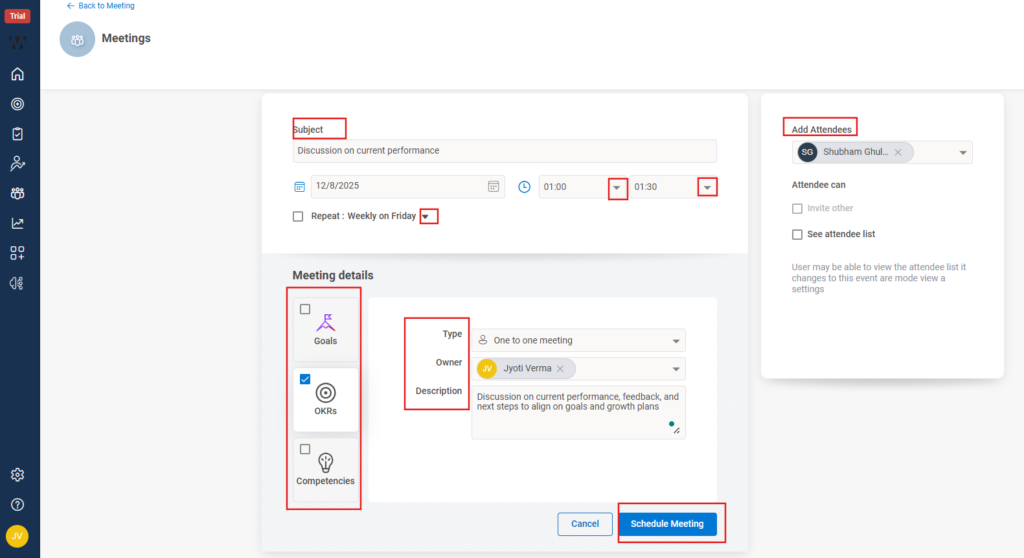
Step 2: A new window will open where you must fill the following details to schedule the meeting.
Enter the Subject for your meeting.
- Select the Date and Start/End Time for the review.
- If needed, set it to repeat/recurring by making a check on the left side beside it (e.g., weekly, monthly).
Add Meeting Details
- Under Type, select One-to-One Meeting.
- Choose the Owner (usually the manager conducting the review).
- Add a short Description outlining the agenda or discussion points.
Select Attendees
- In the Add Attendees panel, search and select the employee(s) you want to review.
- If necessary, allow them to invite others or view the attendee list by checking the relevant boxes.
- Link Performance Data (Optional but recommended)
- Use the Goals, OKRs, or Competencies tabs to attach related performance data so both parties can review them during the meeting.
Save the Meeting
- Click Schedule Meeting.