Worxmate
Define, execute, evaluate and plan your OKR journey
Discover focus, alignment and celebrate success
Manage, Evaluate, and Increase Employee Performance
Prioritize, plan, and deliver tasks effectively
Join leading organizations relying on Worxmate for efficient OKR management and success
Optimize HR functions with our AI-driven performance management
Explore strategic leadership insights and best practices for CEOs
Drive strategic excellence that fuels innovation & success
Empower product leadership with goal alignment
Empower Your Marketing Teams to Drive Growth, ROI, and Brand Impact
Maximize sales performance by data-driven decision making
Empower L&D Teams to drive growth and employee success
Help Center > Frequently Asked Questions > Maintain Type KPI > What is Maintain Type KPI
Step1. Go to the settings section and select the KPI tab.
Step 2. Click Add KPI to create a new KPI.
Step 3. Fill the Attributes and Select Maintain type KPI.
Step 4. Select the Frequency and the Progress value.
Step 5. For At least and At Most type of Progress value Select Distance type Progress Calculation also For Range Type Select Successful Check-ins.
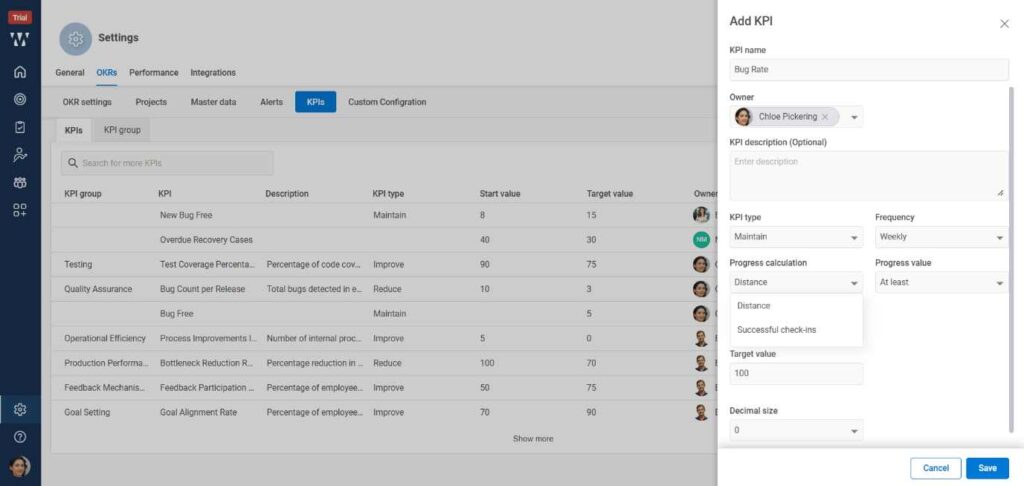
Step 6. Enter the values and save.
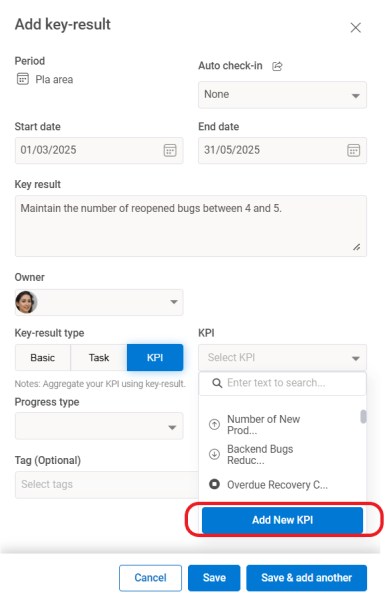
Step 7. You can also add the KPIs directly from the KR as well while creating the KPI type KR, select the Add KPI Button.