 WORXMATE
Quick Answer
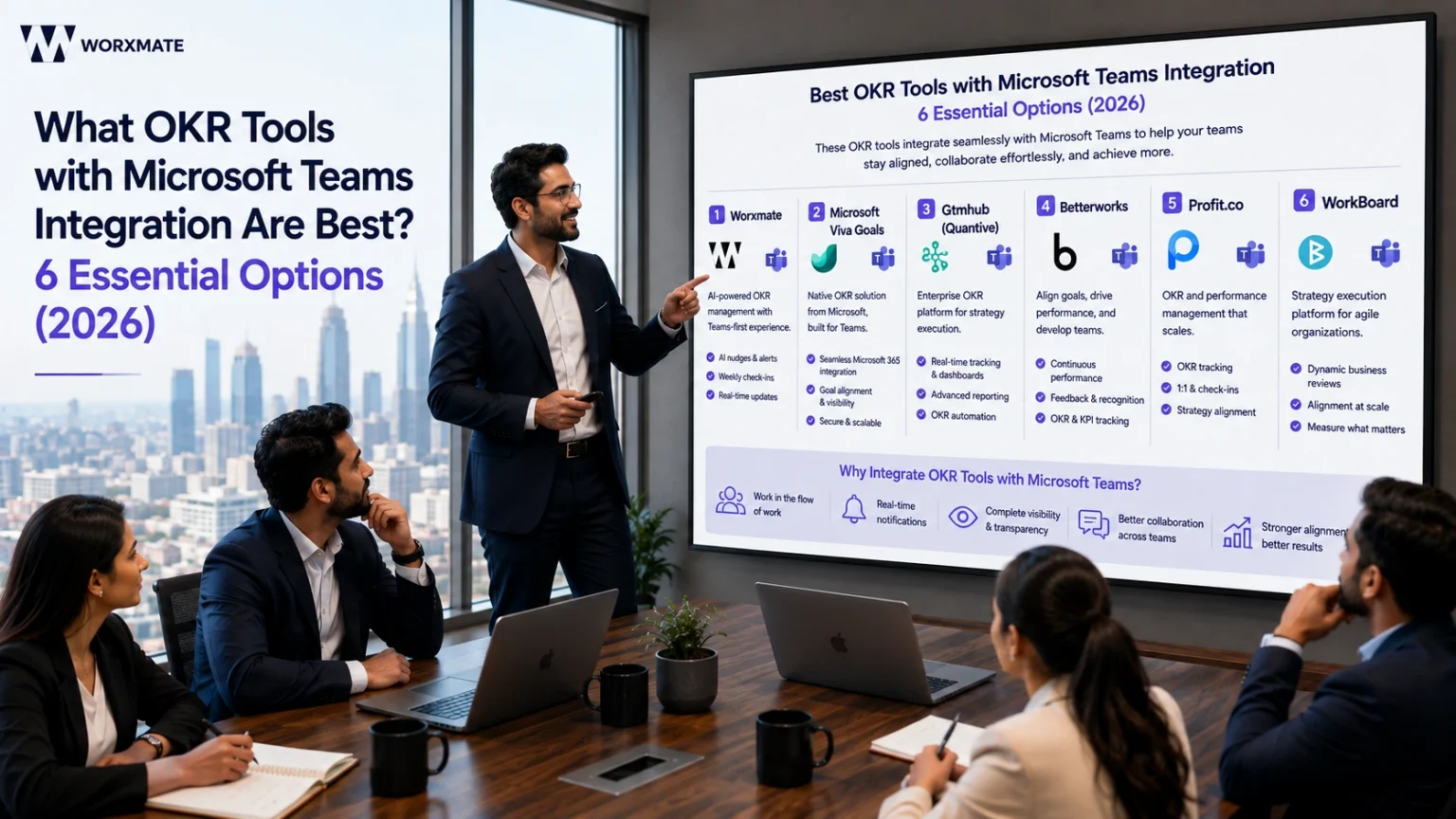
The best OKR tools with Microsoft Teams integration in 2026 are Worxmate, Microsoft Viva Goals, Gtmhub (Quantive), Betterworks, Profit.co, and WorkBoard. Worxmate leads for mid-market teams because it’s built “Teams-first” AI-driven nudges, at-risk alerts, and check-ins all happen inside the Teams chat itself, with three AI models (Orbit, Axis, Nexus) providing intelligence Viva Goals and most competitors don’t have.
What are the best OKR tools with Microsoft teams integration?
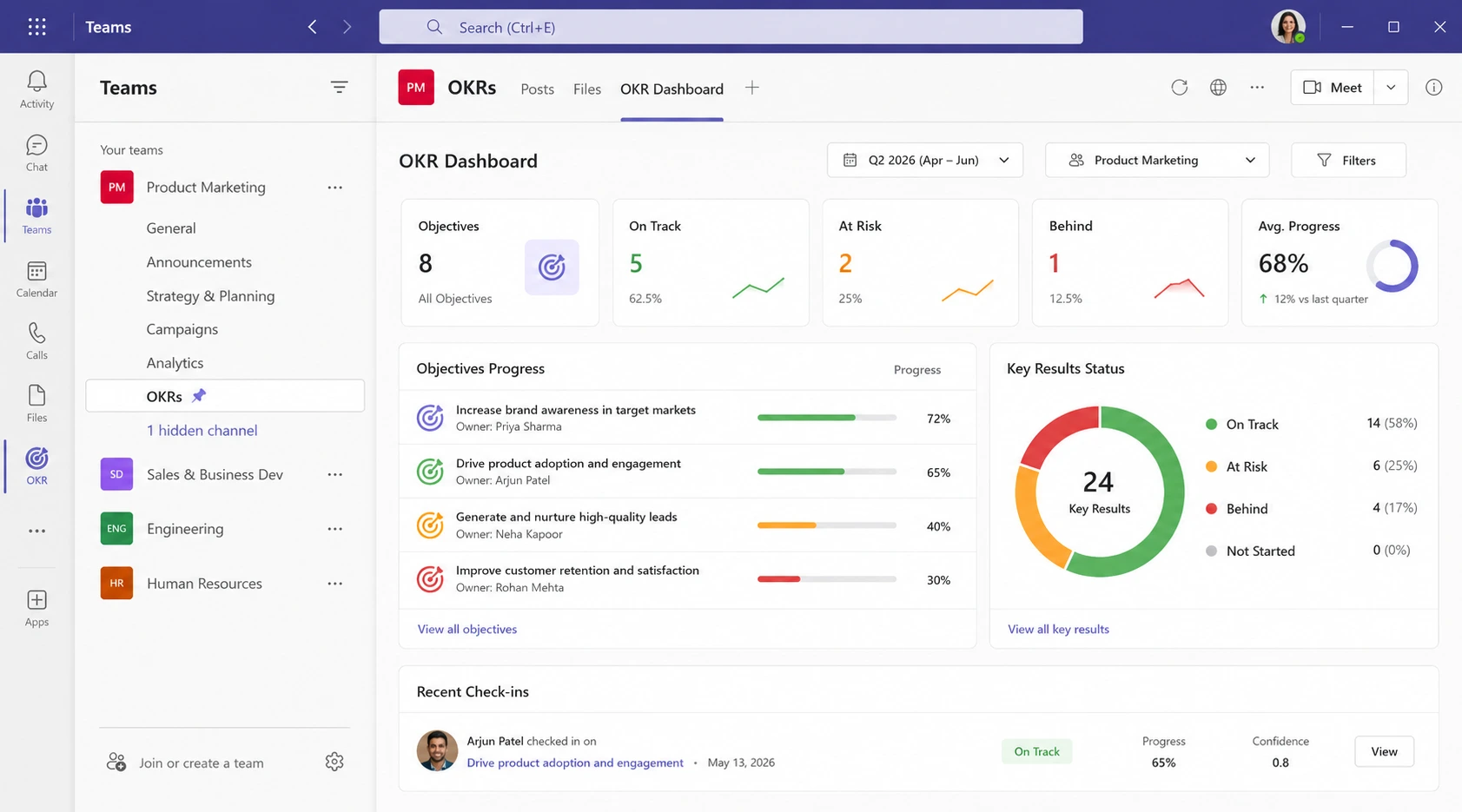
These solutions are specialized software applications that allow organizations to set, track, and manage Objectives and Key Results (OKRs) without leaving the Microsoft Teams interface. By weaving goal management into the daily flow of work, these platforms ensure that strategic priorities remain top-of-mind, fostering a culture of accountability and real-time progress updates.
In the modern corporate landscape, particularly for mid-market companies, the challenge is rarely about setting goals it is about maintaining the momentum required to achieve them. When goal tracking is relegated to a separate spreadsheet or a disconnected portal, it often becomes a “set it and forget it” exercise. Integrating these processes into Microsoft Teams bridges the gap between high-level strategy and daily execution, ensuring that every chat, meeting, and file share is anchored in the company’s broader objectives.
This article explores the strategic necessity of choosing the right OKR tools with microsoft teams integration, the core features that drive adoption, and a detailed comparison of the top solutions available in 2026. We will also examine how these tools impact organizational growth and provide a blueprint for successful implementation.
It also pays to be precise about what you’re actually rolling out. A goal vs objective mix-up at the Teams-channel level compounds fast – if managers are pinning team goals next to individual goals without a shared vocabulary, the dashboard becomes noise instead of a source of truth.
Why Your Team Needs an OKR Tool Integrated with Microsoft Teams
The primary reason organizations seek out OKR tools with microsoft teams’ integration is the reduction of “toggle tax” the cognitive load and time lost when switching between different software applications. Microsoft reports that the average employee switches between apps nearly 30 times a day, leading to a significant drop in focus and productivity. When OKRs live where the work happens, they transition from being a quarterly administrative burden to a living part of the team’s DNA.
For HR Directors and VPs of People, the focus is often on understanding employee satisfaction and engagement. When employees see how their daily tasks contribute to the company’s “North Star,” their sense of purpose increases. Native integration allows for automated “nudges” and notifications within the Teams chat window, reminding users to update their Key Results before a weekly sync. This automation ensures that data is always fresh, providing leadership with an accurate pulse on the organization’s health.
Furthermore, OKR tools with Microsoft teams integration facilitate better transparency. In a distributed workforce, silos can form quickly. By using an integrated tool, any team member can view the progress of cross-functional partners directly within the Teams sidebar. This visibility is essential for strategic planning, as it allows managers to identify bottlenecks or misalignments in real-time rather than waiting for an end-of-quarter review. According to a study by McKinsey, companies with highly aligned employees are 2.3 times more likely to be top-tier financial performers.
This is also where organizational productivity and business planning intersect in a way most software doesn’t handle well. A quarterly business planning cycle that lives in a slide deck rarely survives contact with a chaotic Teams calendar. Tools that surface organizational productivity signals directly inside Teams not in a separate BI dashboard nobody opens – are the ones that actually change how a company plans its quarter.
Achieve Your Goals Faster
See how Worxmate can help your team set clear goals and achieve faster results. Book your free demo today and experience the power of AI-driven OKRs in action.
Key Features to Look for in a Teams-Based OKR Solution
Not all OKR tools with microsoft teams’ integration are created equal. Some are merely “web-wrappers” that open a browser window inside Teams, while others are deeply embedded, leveraging the full power of the Microsoft Graph API. To ensure high adoption rates, a solution must provide a seamless user experience that feels like a natural extension of the Teams interface.
-
Automated Check-in Reminders
The best OKR tools with microsoft teams integration use adaptive bots to send personalized reminders. These bots can prompt users to update their progress directly within a chat thread, saving them from having to navigate to a separate dashboard.
-
Interactive Dashboards and Tabs
Look for tools that allow you to pin OKR dashboards as tabs within specific channels. This ensures that when an engineering team is discussing a sprint, their relevant OKR examples and targets are visible at the top of the screen at all times.
-
Single Sign-On (SSO) and Security
For IT decision-makers, security is paramount. Enterprise-grade OKR tools with microsoft teams integration should support Azure Active Directory (AD) for seamless SSO, ensuring that user permissions are automatically synced with the company’s existing Microsoft 365 hierarchy.
-
Activity Feed Integration
When a milestone is reached or a Key Result is updated, the tool should post an update to the relevant Teams Activity Feed. This social element encourages peer recognition and keeps the entire department informed of wins as they happen.
When evaluating these features, consider how they support performance management. The goal is to move away from annual reviews and toward a continuous feedback loop. If the software makes it difficult to see progress, the methodology will fail. Therefore, the depth of the integration is often more important than the breadth of the feature set.
Top OKR Tools with Native Microsoft Teams Integration
When selecting the right platform, it is helpful to compare how different OKR tools with microsoft teams’ integration handle data visualization and user interaction. The following table highlights the top contenders for mid-market and enterprise organizations in 2026.
| Software Solution | Integration Depth | Key Strength | Best For |
|---|---|---|---|
| Worxmate | Full Native API | AI-driven nudges and automated progress tracking. | Mid-market companies seeking high engagement. |
| Microsoft Viva Goals | First-party | Deep integration with the Microsoft 365 suite. | Enterprises already fully committed to Viva. |
| Gtmhub (Quantive) | Advanced Tab Support | Highly customizable data connectors. | Data-heavy organizations with complex KPIs. |
| Betterworks | Native App | Strong focus on integrated performance reviews. | Large HR-led organizations. |
| Profit.co | Native App | Comprehensive feature set including task management. | Teams needing all-in-one goal and task tracking. |
While Microsoft Viva Goals is a common starting point, many organizations find that they need more specialized OKR tools with microsoft teams’ integration to drive actual behavior change. For instance, companies looking to replace Viva Goals often do so because they require more intuitive user interfaces or better support for performance management systems that go beyond simple goal tracking.
Choosing between these OKR tools with microsoft teams integration requires an assessment of your current tech stack. If your team spends 90% of their day in Teams, a tool that offers a robust bot interaction- allowing users to search for OKRs or update status via a simple command-will always outperform a tool that requires a separate login.
Native API vs Web-Wrapper: What the Integration Depth Column Actually Means
The “Integration Depth” column above is the one buyer skip past – and the one that predicts adoption six months later. A web-wrapper opens an iframe inside a Teams tab; a full native integration reads and writes through the Microsoft Graph API, so bots, activity feeds, and SSO all work without a second login. If you’re also comparing tools outside this shortlist, this breakdown of OKR tracking tools and how real-time OKR tracking actually works under the hood is worth reading before you sign a contract, since “integration” gets used loosely in vendor decks.
How Worxmate Transforms MS Teams into a Performance Powerhouse
Worxmate stands out among OKR tools with microsoft teams’ integration by focusing specifically on the needs of mid-market companies that require agility and high adoption. Unlike legacy platforms that feel clunky, Worxmate’s integration was built with a “Teams-first” philosophy. This means every core function of the OKR software is accessible without ever leaving the Teams application.
One of the unique ways Worxmate utilizes the Teams environment is through its AI-powered insights. The platform analyzes progress patterns and sends proactive alerts to managers if a Key Result is “at risk.” These alerts appear as direct messages in Teams, allowing the manager to immediately start a conversation or schedule a “check-in” meeting with one click. This level of connectivity is what separates basic tracking from true OKR tools with microsoft teams integration.
Furthermore, Worxmate integrates task management directly into the goal-setting process. This allows employees to see exactly how their daily tasks in Teams relate to their quarterly OKRs. By closing the loop between “what we are doing” and “why we are doing it,” Worxmate helps leaders achieve long-term business goals with examples of clear, actionable progress. This holistic approach ensures that the OKR framework doesn’t become a distraction, but rather a catalyst for focused work.
Achieve Your Goals Faster
See how Worxmate can help your team set clear goals and achieve faster results. Book your free demo today and experience the power of AI-driven OKRs in action.
Worxmate’s DEEP AI™ Framework, Running Inside Microsoft Teams
What makes those “at-risk” alerts possible isn’t a single feature – it’s the DEEP AI™ framework underneath Worxmate, which stages every OKR through four AI-backed steps and surfaces each one natively in Teams:
Explore each stage: Define • Execute • Evaluate • Plan
Three AI models sit underneath that framework, and this is what most other tools on the comparison table simply don’t have. Orbit AI flags attrition risk and burnout four to eight weeks before a review, right where managers already read their Teams notifications. Axis AI reads your OKR data and posts the single fastest lever to pull when a Key Result stalls. Nexus AI maps where strategy stops cascading from leadership channels down to individual contributor chats. The plumbing that makes all three visible in Teams is Worxmate’s OKR software integrations, which connect Teams, Slack, and Jira alongside 36+ other tools to the same data layer.
Aligning Individual, Team, and Organizational Goals in One Teams Workspace
The reason this matters for adoption is structural. Most failed rollouts don’t fail because the bot is annoying – they fail because nobody can see how their individual goals ladder up to departmental goals and, from there, to organizational goals. Worxmate renders that cascade as a visible chain inside the same Teams tab a manager already has pinned, rather than as a separate org chart nobody opens. That’s also the moment to get precise about goal management as a discipline, not just a dashboard – the tool should make it obvious which goals are aspirational goals and which are ambitious goals with a committed number attached, so a channel full of green checkmarks doesn’t quietly mean less than it looks like.
Overcoming Common Challenges of OKR Adoption in Teams
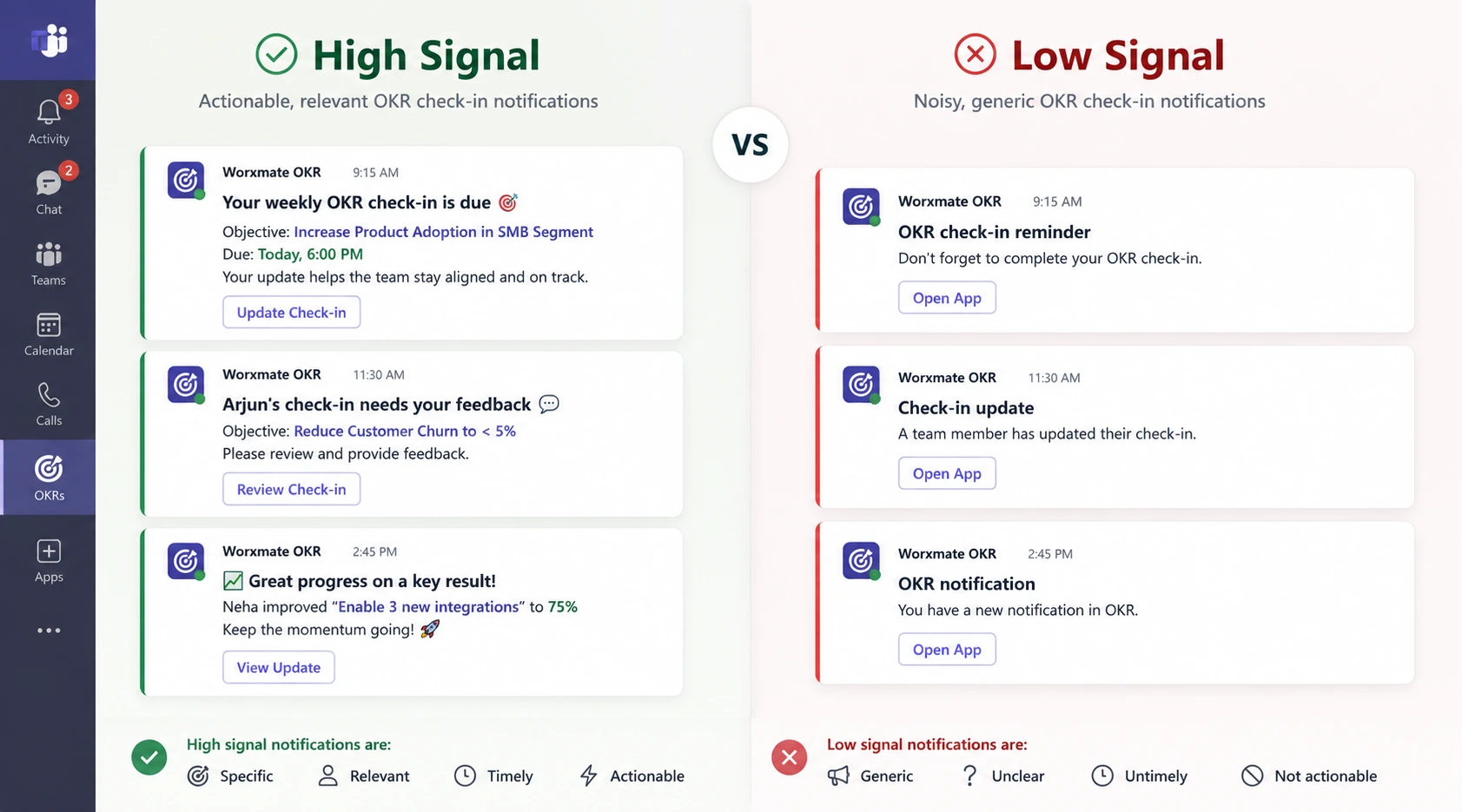
Even with the best OKR tools with microsoft teams integration, adoption is not guaranteed. The most common hurdle is “notification fatigue.” If a tool sends too many alerts, users will eventually mute the app or ignore the messages. Successful organizations combat this by configuring their integration to be “high signal, low noise.” This involves setting specific triggers for notifications, such as when a Key Result moves from “On Track” to “Behind,” rather than alerting the team for every minor percentage update.
Another challenge is the lack of executive buy-in. If leadership doesn’t use the OKR tools with microsoft teams integration to run their own meetings, the rest of the staff will view it as a discretionary task. Companies like Adobe have successfully overcome this by mandating that all departmental reviews are conducted using the live dashboards within their integrated software. This ensures that the data is treated as the “single source of truth.”
Finally, there is the issue of data quality. OKR tools with microsoft teams integration are only as good as the information entered into them. To prevent “garbage in, garbage out,” organizations should invest in OKR consulting or internal training to teach employees how to write measurable Key Results. When the goals are clear and the tool makes updating them effortless, the friction of adoption virtually disappears.
Fostering a Growth Mindset When OKRs Live Inside a Chat Tool
There’s a fourth, quieter challenge the checklist above misses: OKRs inside a chat tool can start to feel transactional a box to tick between messages – unless the culture around them treats missed targets as data, not blame. Some of the most effective ways to foster a growth mindset among employees are the simplest: have managers narrate their own “At Risk” Key Results out loud in the channel, and tie professional goals and development goals for work to the same dashboard employees already check for their OKRs, so growth and goal-tracking don’t live in two different systems.
Three Mistakes Companies Make with Teams-Integrated OKRs
Even with the best OKR tools with Microsoft Teams integration, organizations often stumble in predictable ways:
-
Pitfall 1: Over-Notification
Sending alerts for every minor update leads to users muting the integration entirely. The fix: configure notifications only for status changes from “On Track” to “At Risk.”
-
Pitfall 2: Treating OKRs as a Quarterly Event
When teams only touch their OKRs during planning and review sessions, the tool becomes shelf ware. The solution: pin OKR dashboards as tabs in daily-use channels.
-
Pitfall 3: No Connection to Daily Tasks
If employees cannot see how their specific assignments link to company Objectives, engagement drops. Bridge this gap by ensuring your chosen tool connects task management to goal tracking.
KPI vs OKR: Keeping Metrics Clean Inside a Shared Teams Channel
A pitfall closely related to notification fatigue is metric confusion. Teams’ channels get noisy fast when a KPI dashboard and an OKR dashboard both post updates to the same thread, and nobody has drawn the line between them. Before rolling out any of the tools compared above, get the team aligned on OKR vs KPI – Objectives and Key Results describe an ambitious outcome, while KPIs are the ongoing health metrics you watch continuously. The best OKR tools with microsoft teams’ integration let you display both side by side without merging them, and this guide on using OKR and KPI together is a useful reference if your organization is migrating from a pure KPI dashboard. If procurement is comparing vendors on this specific point, this breakdown of OKR vs KPI software is worth reading alongside the comparison table above.
Beyond Viva Goals: Why Teams Are Migrating Mid-Cycle
It’s worth naming the elephant in the comparison table directly: Microsoft Viva Goals retirement is now complete, which is why so many of the organizations researching OKR tools with microsoft teams’ integration in 2026 are really asking a narrower question – how do we replace Viva Goals without losing the Teams-native experience we’d already gotten used to? If that’s your situation, the good news is that “Teams integration” and “not Viva Goals” aren’t in tension; platforms like Worxmate were built specifically to give teams that same embedded feel with a fuller AI layer behind it. This step-by-step guide on how to migrate from Viva Goals covers data export, timelines, and the common pitfalls of a mid-cycle switch.
Rolling Out Teams-Integrated OKRs to Remote and Hybrid Teams
Distributed teams are where the case for OKR tools with microsoft teams’ integration is strongest, because Teams is often the only shared space a remote org has. If your workforce spans time zones, look specifically at how a platform handles OKR tracking for remote teams – async check-in windows matter more than real-time bot pings when half the team is asleep during a manager’s morning stand-up. Worxmate and several competitors on the table above support fully remote OKRs, and organizations running a mixed office/remote model should specifically evaluate OKR software for hybrid teams rather than assuming a remote-first tool will translate cleanly to a hybrid one.
From Individual Goals to Organizational Goals: What Your Teams Dashboard Should Actually Track
One thing the “best tools” comparison misses is that not every goal belongs at the same altitude, and a Teams-integrated dashboard that flattens them all into one list will confuse people fast. A useful mental model, and one worth building into how you configure any of the tools above:
Getting this right also means being deliberate about goal type, not just goal level. Types of goals – committed vs aspirational, short-term vs long-term – should be visually distinct inside the same Teams tab. And for HR and People teams specifically building out this cascade, a few reference points help: HR goals for the function’s own OKRs, leadership goals for what executives should be modeling in their own channels, and a concrete set of staff development goals: 10 examples if you’re populating the tool for the first time and need starting templates rather than a blank canvas.
Conclusion: Choosing the Right Path for Your Organization
In 2026, the success of a performance management strategy depends on its accessibility. Selecting the right OKR tools with microsoft teams’ integration is no longer just an IT decision; it is a strategic move to foster a culture of transparency and high performance. By meeting employees where they already work-in Microsoft Teams-organizations can ensure that their most important goals never fall by the wayside.
Whether you are looking to replace a legacy system or starting your OKR journey from scratch, the focus should remain on integration depth, ease of use, and the ability to drive meaningful engagement. Platforms like Worxmate provide the necessary bridge between complex strategic frameworks and the fast-paced reality of daily work.
If your rollout also needs to fix how goals get written in the first place – not just where they’re displayed – that’s a coaching problem as much as a software one. Worxmate’s OKR consulting practice and its OKR software pricing page are both worth a look before you commit to a single-vendor Teams rollout.
Ready to accelerate your goal-tracking journey? Start your free trial with Worxmate today and discover how our Performance Management software can transform your strategy into measurable results.


Written by
An OKR Coach with 20+ years of implementation experience, Madhusudan has guided over 50 organisations through successful OKR transformations, training more than 500 leaders. Learn more about Worxmate.
