 WORXMATE
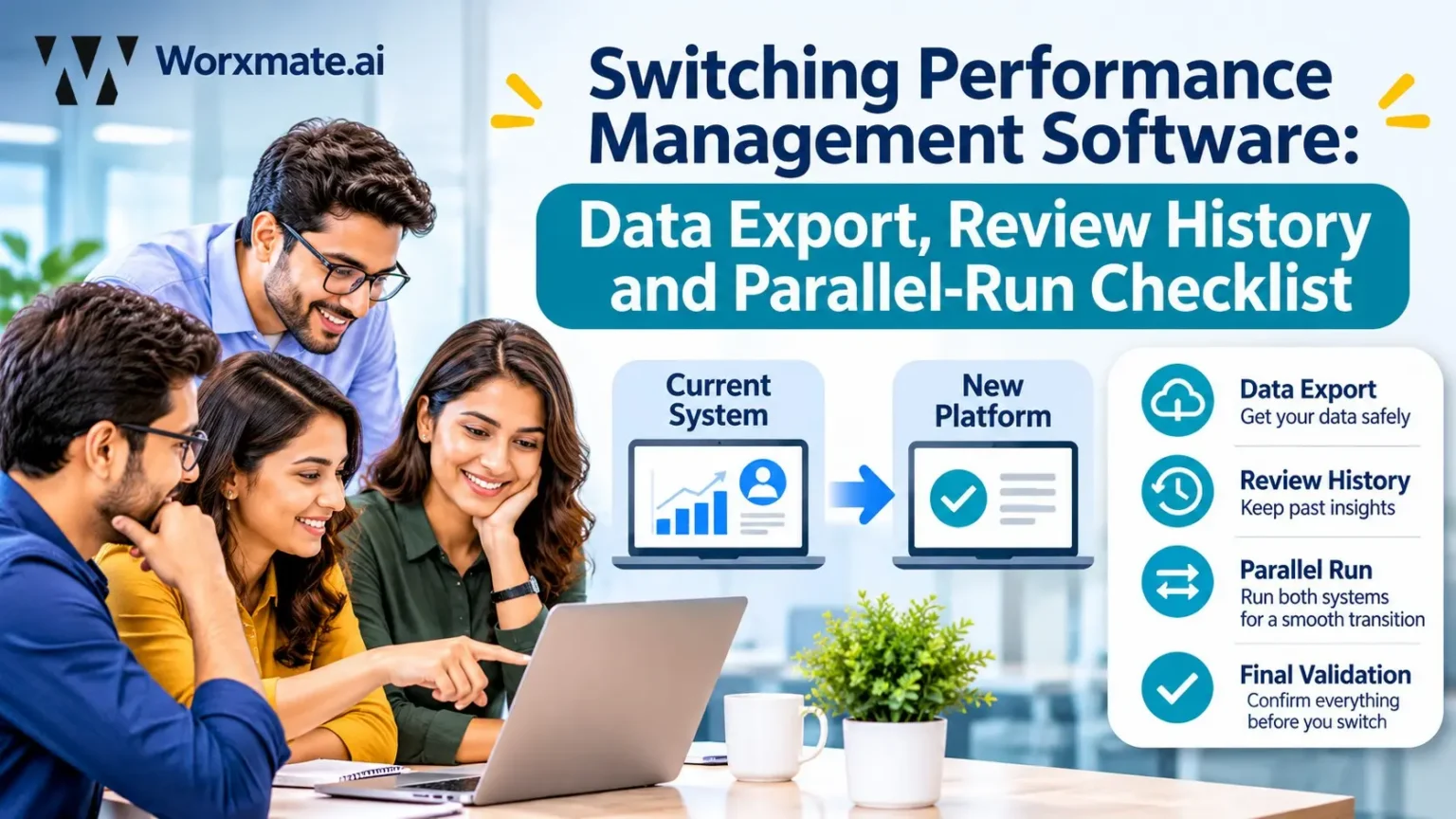
To switch performance management software without losing data, work in this order: confirm contract exit terms (renewal date, notice period, data ownership), export review history, ratings, goals, 360 feedback and 1:1 notes, clean and map every field and rating scale, run old and new systems in parallel with a pilot team, then cut over with a rollback plan. Decommission the old system only after stakeholder sign-off. Skipping the parallel run is the most common reason a pms software switch fails.
The export took four seconds. That should have been the warning.
The HR operations lead opened the file expecting three years of review history. What she got was a flat CSV with one final rating per employee per cycle. No manager comments. No calibration notes. No record of who changed which rating, or why. The new vendor’s onboarding call was nine days away, and the old contract ended in six weeks.
I have heard some version of this scene from HR leaders across FinTech, Pharma, Retail, Manufacturing, Energy and Utilities, IT services, SaaS and Gaming. It is the most predictable failure when a team decides to switch performance management software: the decision is made on features, and the exit is planned on hope.
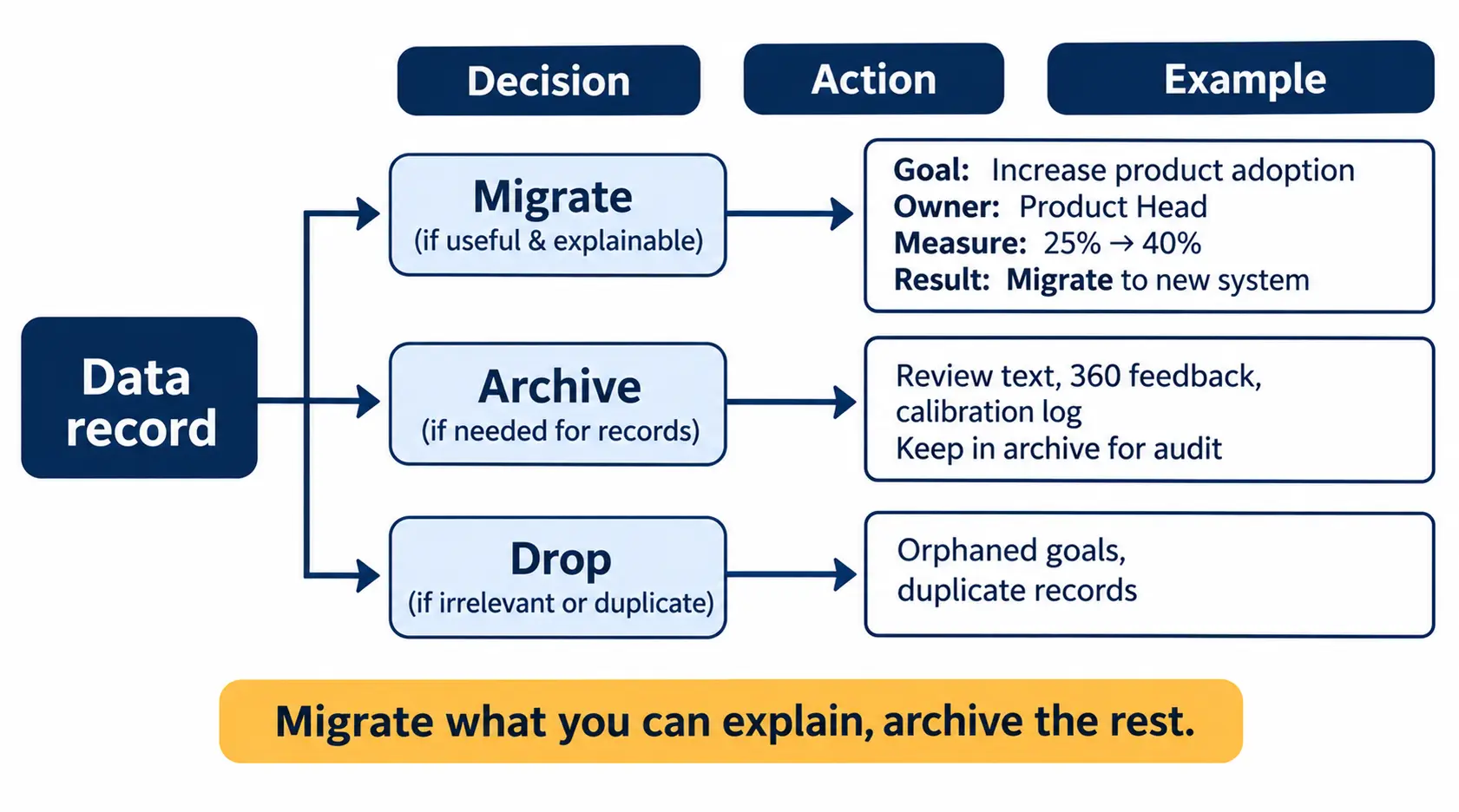
My position is simple. A switch is not a data transfer. It is a decision about which parts of your performance history your organisation still believes, and which parts it carries out of habit. Treat it as an IT ticket and you will lose the history that matters and keep the noise that doesn’t.
This is the checklist I would hand an HR Operations Lead or a CHRO before they sign anything. It covers contract exit, performance management software data export, review history export, field mapping, the parallel run, cutover and decommissioning. It is about leaving well, not choosing a vendor. A performance management software migration is a project with an owner, a date and a budget, not a weekend task. For the buying side, start with how to buy performance management software.
About the author: Madhusudan Nayak (Maddy) is Co-Founder and CEO of Worxmate. He has 20+ years in strategy execution, 10+ years implementing OKRs and performance management, and has held 135+ conversations with HR leaders about why their programmes stall. He created the DEEP AI™ framework and the Orbit, Axis and Nexus AI models.
Why Teams Switch Performance Management Software (and What Breaks First)
When HR leaders tell me they want to change performance management software, the stated reason is almost always a tool problem. The real reason is usually one of five.
The first is a ceiling. The module inside the HRIS handles forms but not continuous feedback, and the gap shows up at calibration. I cover that category distinction in performance management software vs HRIS. The second is the opposite: the team has outgrown spreadsheets and is switching from spreadsheets to performance management software, which turns the export problem into an import problem. The comparison in performance management software vs Excel explains where that line sits.
The third is price at renewal. The fourth is a vendor retiring a product. Viva Goals was discontinued in December 2025, and teams still moving off it can use the Viva Goals retirement explainer and the Viva Goals migration guide. The fifth is adoption, which I unpack in PMS adoption challenges.
Here is the field observation I would ask you to sit with. In my conversations with HR leaders, two of the nine systemic failures I see most are HR stuck playing referee instead of running a strategic process, and KRAs disconnected from business goals. A new tool fixes neither. It gives you a cleaner place to repeat them. Before you change performance management software, read fixing broken performance management systems and decide whether you should replace performance management software or replace a habit.
Is the tool the problem, or the process around it?
Run the Organization Performance Audit before you commit to a vendor change. It shows whether a switch will fix the gap or just move it.
How to Switch Performance Management Software: The 9-Step Checklist
Below is the performance management software switching checklist in one view. The sections that follow explain each step. Use it as your performance management system migration checklist and your project plan.
| Step | What you do | Owner | Risk if skipped |
|---|---|---|---|
| 1. Contract exit | Confirm renewal date, notice period, data ownership | HR Ops + Legal | Auto-renewal or locked data |
| 2. Export inventory | List and export every data type | HR Ops + IT | Lost comments and history |
| 3. Clean and map | Cleanse data, map fields and rating scales | HR Ops | Ratings that mean different things |
| 4. Retention and compliance | Decide what is kept, archived, deleted | CHRO + Legal | Privacy exposure |
| 5. Cutover timing | Pick a window around the review cycle | CHRO | Split cycle, angry managers |
| 6. Integrations | Set up SSO, HRIS sync, provisioning | IT | Wrong reporting lines |
| 7. Parallel run | Run both systems with a pilot team | HR Ops | Failures found on go-live day |
| 8. Change management | Train managers, secure sign-off | CHRO + BU Heads | Quiet non-adoption |
| 9. Go-live and decommission | Cut over, monitor, retire old system | HR Ops + IT | Two sources of truth |
Step 1: Read the performance management software contract exit terms first
Before any technical work, read the contract. Every performance management vendor switch I have watched go badly started with a contract nobody had read. Performance management software contract exit is where most teams lose leverage, because they read the terms after they have already told the vendor they are leaving.
Check four things. The renewal date, because auto-renewal clauses are quietly common. The notice period, which can be 60 or 90 days. Data ownership, meaning who owns the review text and feedback your managers wrote. And vendor lock-in, which shows up as export limits, paid export fees or formats that only the old tool can open.
Ask the vendor in writing what a full export includes and how long it takes. Treat a vague answer as a red flag. This is also where the vendor-evaluation questions in our PMS evaluation guide help, because the same questions work in reverse.
Step 2: Build the performance management software data export inventory
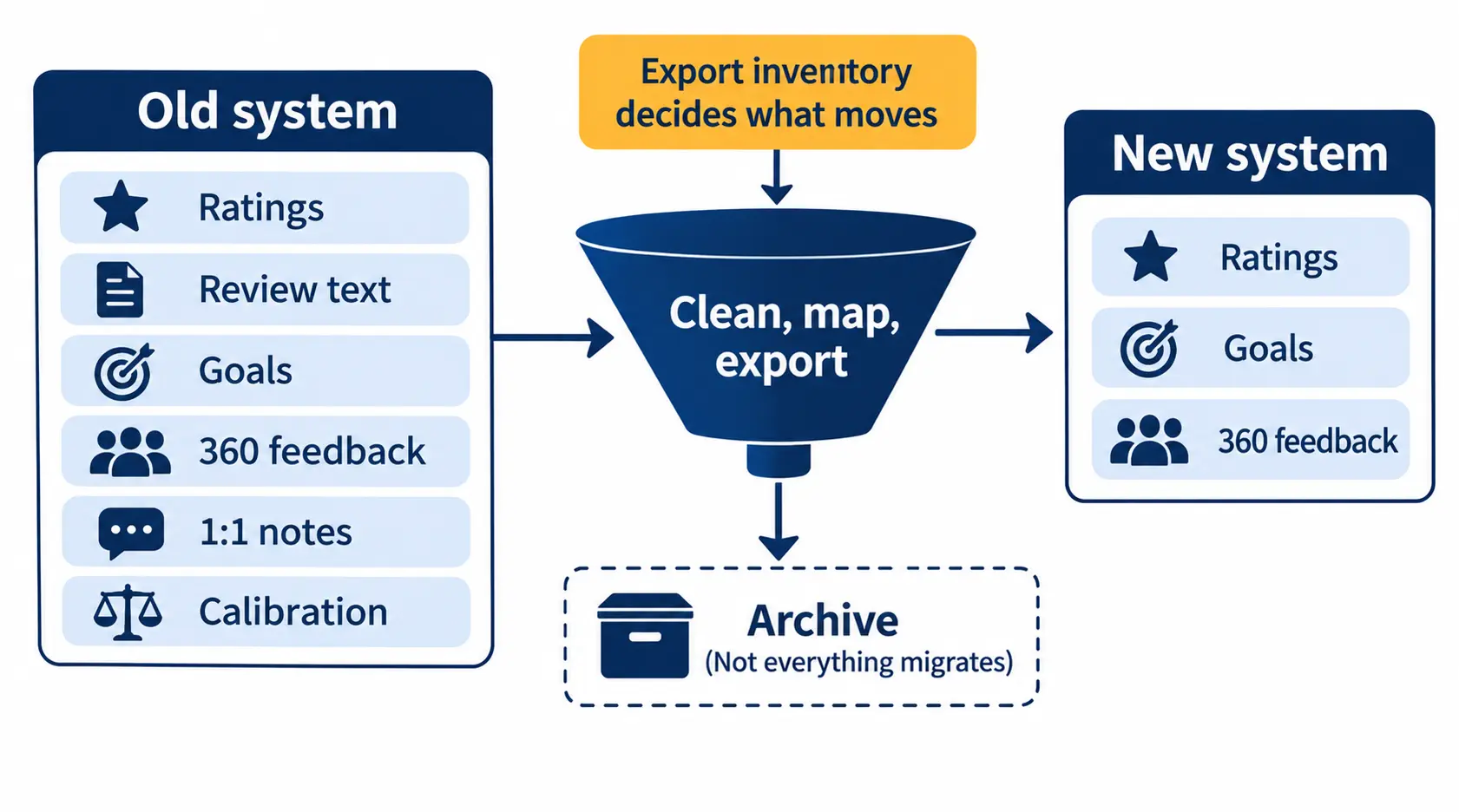
Do not ask “can we export?” Ask “what exactly are we exporting?” A real performance management software data export covers more than a ratings table. Build an inventory and tick off each item.
| Data type | Typical export route | Migrate, archive or drop | Watch for |
|---|---|---|---|
| Historical performance ratings | CSV export | Migrate | Final rating only, no context |
| Manager and self-review text | API export or PDF | Archive | Truncated comment fields |
| Goal history | CSV or API | Migrate selectively | Goals with no owner or score |
| 360 feedback | Vendor report or API | Archive | Anonymity rules |
| 1:1 notes | API or manual | Archive | Private notes with access limits |
| Calibration data | CSV with change log | Archive | Missing before-and-after ratings |
| PIPs and development plans | CSV or document export | Migrate active, archive closed | Open plans mid-flight |
Three items in that table are where I see exports fail. The first is review history export that returns a number without the narrative that justified it. Next year’s manager will see a “3” and invent a story for it. The second is 360 feedback data export that ignores anonymity settings, which is a trust problem, not a technical one. Read our 360 feedback process before deciding what travels. The third is 1:1 notes export, which is usually missing because nobody thought of 1:1s as records. In my experience that is the same instinct behind 1:1s being treated as optional. If your team runs them well, standardising 1-on-1 meetings is worth doing before you move.
A CSV export performance data file should open cleanly in a spreadsheet, with one row per record and no merged cells. Ask for both that and an API export. CSV is fine for flat tables. The API export is how you capture nested comments, timestamps and audit trail entries. Also export calibration data with the change log. If you ever need to defend a rating, the performance calibration process record is your evidence.
Step 3: Clean and map before you migrate performance review history
Data cleansing is the unglamorous step that decides the outcome. Duplicate employees, departed managers, renamed departments and blank scores all break an import silently.
Review history migration is the part employees notice first, because they check whether their last rating survived. To migrate performance review history, do data mapping in three passes. First, field mapping: match every old field to a new one, and decide what has no home. Second, rating scale mapping: a five-point scale in the old system and a four-point scale in the new one cannot be converted by simple arithmetic. Third, performance review data migration rules for owners: every migrated record needs a current owner or it becomes an orphan.
Rating scale mapping is where I would slow you down. When you migrate ratings between systems, a “meets expectations” from one tool is not the same population as a “meets expectations” in another. Orbit AI tracks a signal called Rating Inflation Drift, and the lesson applies here: inflated ratings carried into a new system become the new baseline. Document your mapping logic and keep it with the data.
Goal history deserves a harder filter. Goal history migration should carry forward goals that had an owner, a measure and a result. In one European fintech I worked with, around 100 people, goals were KPI-led: plenty of metrics, no clarity about what needed to change. Migrating that history would have preserved activity and hidden the absence of outcomes. If you cannot explain what a goal produced, archive it, do not migrate it.
Keep accountability, not just records
Performance Management 3.0 covers how to rebuild growth and accountability after a platform change, so your new system starts cleaner than your old one.
Step 4: Settle data retention and compliance
Performance records are personal data. Decide data retention rules before the migration, not after. Which records are kept, for how long, where they sit, and who can open them?
GDPR and DPDP data handling both expect you to know what you hold and why. I am not a lawyer, so confirm specifics with your legal team, but the working questions are the same everywhere. What is the lawful basis for keeping old reviews? Who consents to what moves to a new processor? What is deleted from the old vendor, and when?
Performance data retention when switching has one more trap: your old vendor still holds copies. Performance management vendor offboarding should include a written deletion confirmation, and your audit trail should show what was exported, by whom and when. Data ownership should already be settled from Step 1. If it isn’t, fix that now.
Step 5: Choose cutover timing around the review cycle
Review cycle timing is the single biggest decision in your performance management software transition plan. A mid-cycle switch can work, but it is the hardest option, because managers hold half-written reviews in one system and expect to finish them in another.
My preference is year-end cutover or the quiet gap just after a cycle closes. Switching HR software mid-cycle makes sense only when the contract forces your hand, and then I would freeze the old system for the open stage and migrate only after it closes. Set your implementation timeline backwards from the cutover date, and leave a buffer for the export surprises Step 2 will produce.
If you are planning around a financial-year cycle, the guidance in PMS implementation in India and the performance management cycle will help you place the window.
Step 6: Wire up SSO, HRIS sync and user provisioning
Most failed go-lives I hear about fail on identity, not features. SSO and HRIS sync decide who sees whom. If reporting lines are wrong, managers review the wrong people, and the damage to trust is immediate.
Test user provisioning with real edge cases: new joiners, leavers, transfers, dotted-line managers. Confirm what the new tool treats as the system of record. Our note on OKR software integration with HRIS covers the integration questions that apply to performance data too.
Step 7: Run a parallel run performance management system test
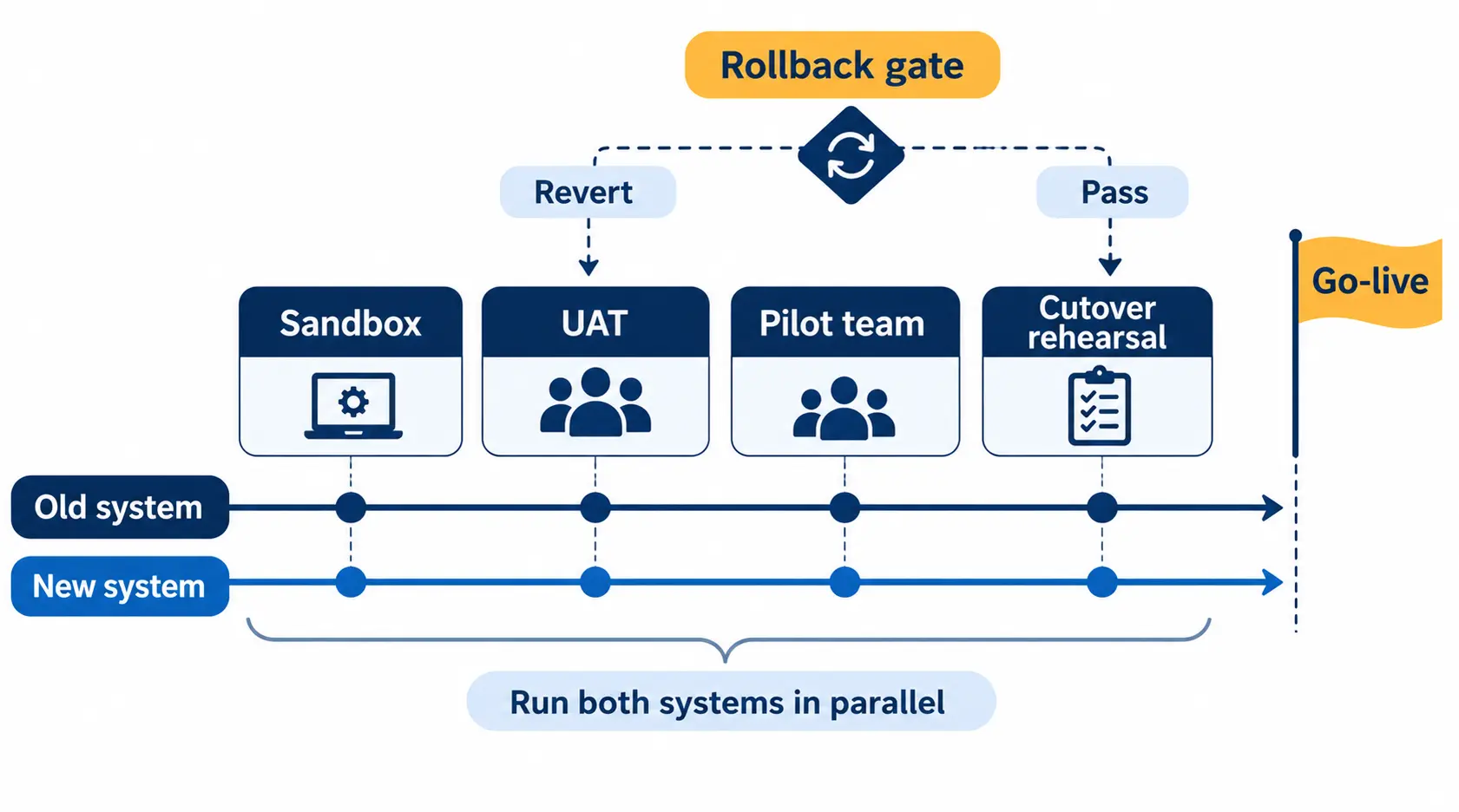
This is the step teams cut to save time, and it is the one I would never cut. A parallel run performance management system test means both tools hold the same live data for a short, defined period, so you can compare outputs before anyone depends on the new one.
Start with sandbox testing using dummy and anonymised data. Then move to UAT with a pilot team of one department or one manager group. Define parallel run duration up front, because open-ended parallel runs become permanent double entry. For most teams, one meaningful review stage is enough.
| Parallel run phase | What to test | Pass condition | Fail action |
|---|---|---|---|
| Sandbox | Import of anonymised ratings and goals | Row counts and scores match source | Fix field mapping, re-import |
| UAT | Manager and employee workflows | Pilot users finish tasks unaided | Adjust setup and training |
| Pilot team | One live review stage in both systems | Outputs reconcile, no lost comments | Extend pilot or invoke rollback |
| Cutover rehearsal | Full migration dry run, SSO, permissions | Timed run completes in the planned window | Re-plan the cutover |
Use the pilot to check one more thing: bias. The Third Eye Layer, my term for real-time bias monitoring before calibration, is easier to build into the new system now than to retrofit later. Our guide to performance review bias explains what to watch for.
Your performance management software cutover plan should list who does what, in what order, with timings. The performance management cutover itself should be dull. And write the performance management software rollback plan before you need it: the trigger conditions, who decides, and how long the old system stays read-ready. This parallel run checklist is also where an unclear performance management system implementation plan shows its gaps.
Step 8: Run change management and manager training
Change management is not an email. In my experience the question every manager silently asks is the same one I see in every rollout: what is in it for me? Answer it before go-live, not after.
Manager training should be short, role-specific and tied to a real task, such as writing a review or logging a 1:1. Secure stakeholder sign-off from BU Heads and the CHRO on the success criteria, so “done” means the same thing to everyone. How performance management software reduces manager workload is a useful argument to use here, and performance management software for managers shows what managers actually need.
Will managers actually use the new system?
The Performance Culture Maturity Framework helps you gauge readiness before go-live, so training targets the gaps that really exist.
Step 9: Use a go-live checklist, then decommission the old system
Your go-live checklist should be short and binary: data reconciled, integrations live, managers trained, sign-off recorded, rollback ready. Anything unchecked is a delay, not a risk you accept quietly.
After go-live, keep the old tool read-only for a defined period. Put a date on the task to decommission old system access, and then decommission the old system formally: confirm a final archive, revoke access, cancel the contract in writing and collect the deletion confirmation from Step 4. Two live systems of record is how you end up reconciling ratings at the next calibration. Treat decommissioning as part of the project, not an afterthought.
What to Look for in the Platform You Switch To
Switching is also your best chance to change performance management software for the right reasons. Use the features checklist for performance management software and weigh the performance management software ROI before the contract is signed. If you are weighing named vendors, Lattice alternatives is a useful starting point.
My own test is the OKR Coach question: does this platform tell HR whether their people are moving the business, or only whether they completed the process? That is what I mean by the PMS-OKR Bridge, the structural link between performance and business execution. Read OKR vs PMS software if you are unsure which problem you have, and look at our OKR software if goals are the gap.
Here is where the Worxmate models fit after the move. Orbit AI reads people signals: Burnout Risk, Attrition Trigger, Engagement Decline, Top Performer Flight Risk, Rating Inflation Drift and Skills Decay. Axis AI shows whether performance is moving business outcomes. Nexus AI gives the organisation-level view. And the DEEP AI™ framework keeps execution honest: Define sharpens goals, Execute runs check-ins, Evaluate scores results, and Plan carries the learning into the next cycle. If you are moving to Worxmate, explore our pms software page.
What I’d Tell a Client
“A migration is not a data transfer. It is a decision about which parts of your performance history your organisation still believes.”
If you remember one thing, make it this. Export more than you think you need, migrate less than you want to, run both systems long enough to trust the new one, and write down the rollback plan before you need it. Most switches that fail are not technology failures. They are sequencing failures.
The software is the infrastructure. The coaching is the capability. You need both, and in the right order.
Path 1: The platform. If you are ready to evaluate a new system, see our performance management software, check pricing or book a demo and bring your export inventory with you.
Path 2: The consulting. If you suspect the platform is not your first problem, OKR consulting helps your leaders and managers build the capability that makes any system work, so the next switch, if there is one, is a choice and not a rescue.


Written by
An OKR Coach with 20+ years of implementation experience, Madhusudan has guided over 50 organisations through successful OKR transformations, training more than 500 leaders. Learn more about Worxmate.