 WORXMATE
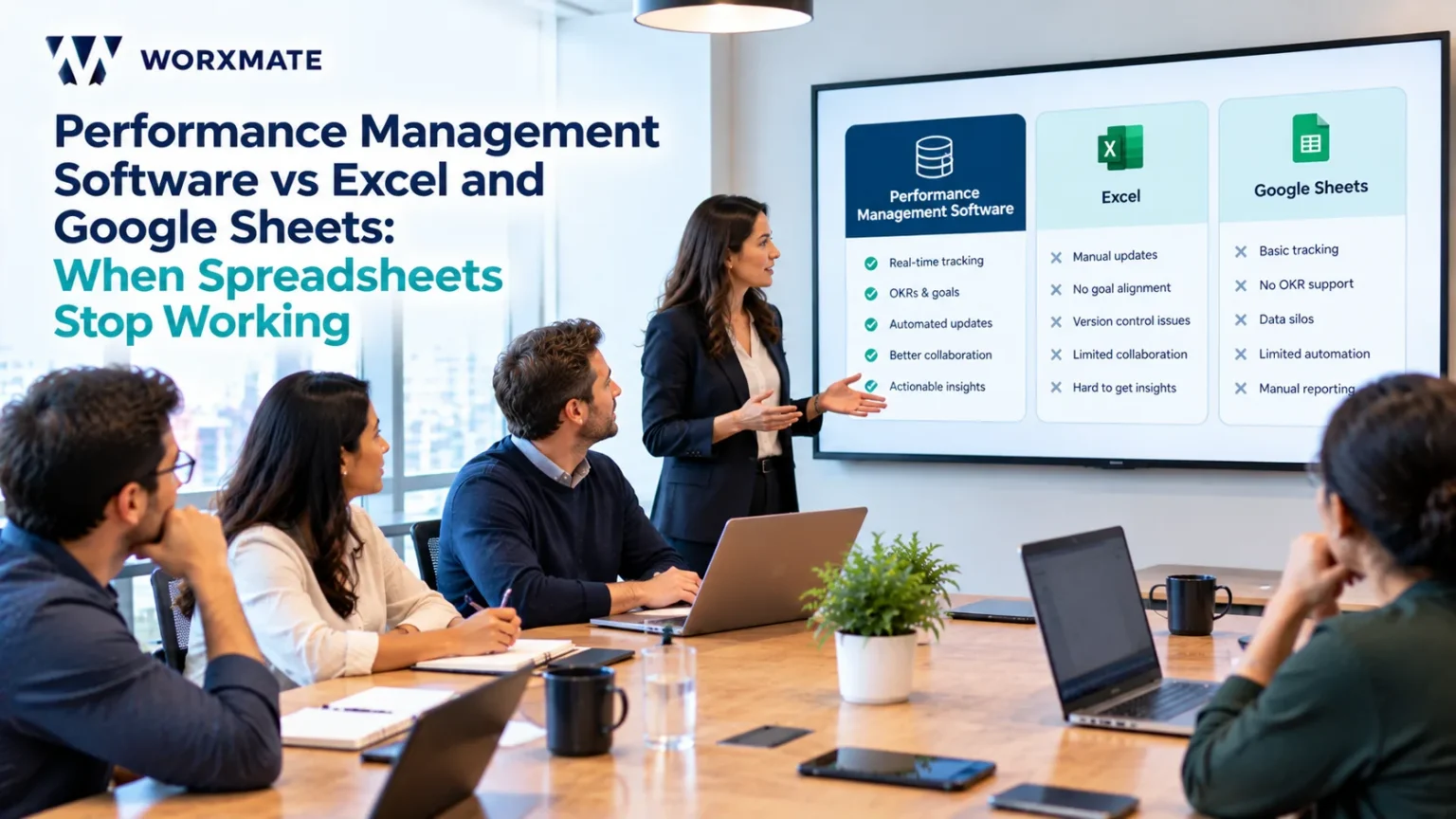
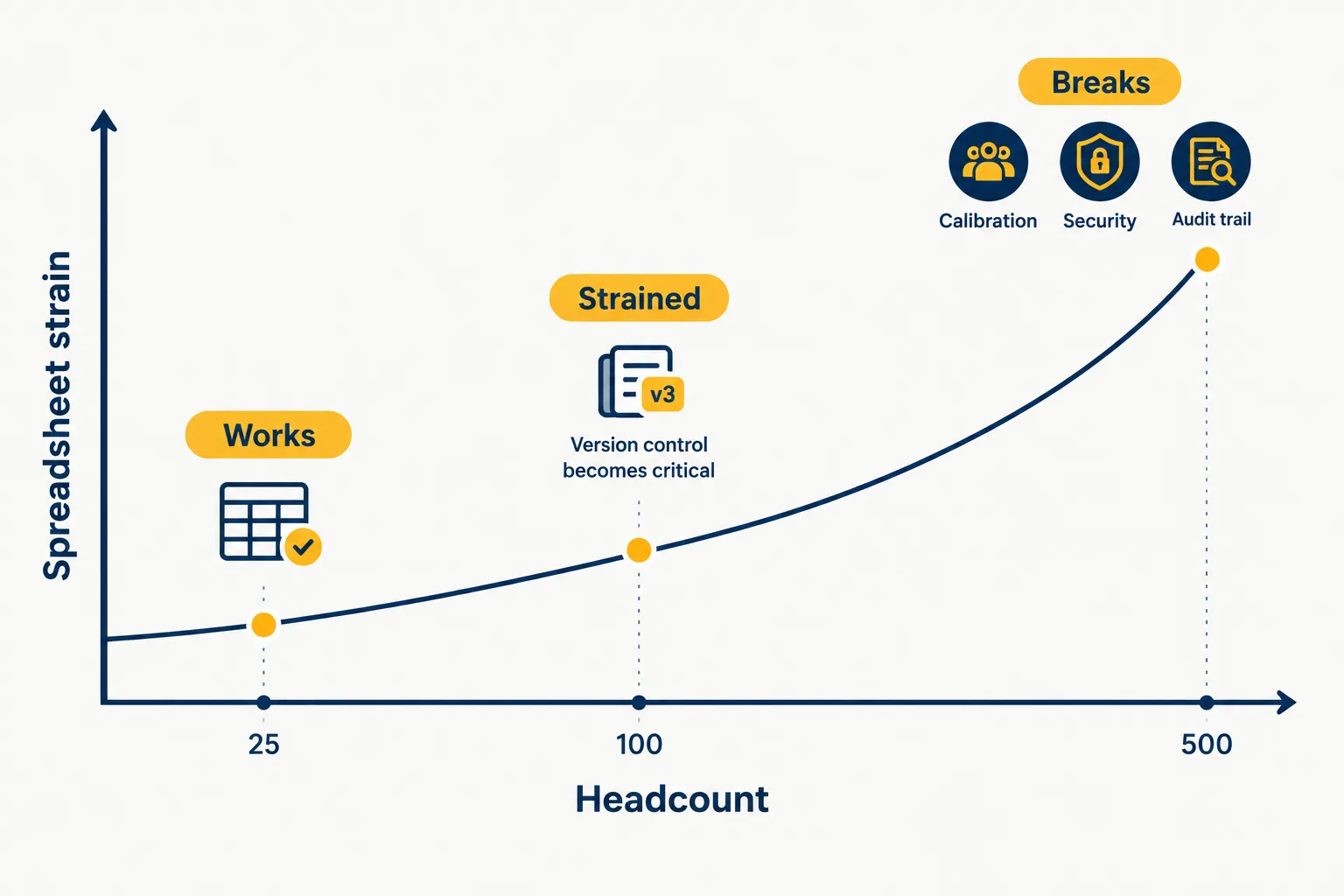
Performance management software vs Excel comes down to scale and risk. In my experience, Excel works for one review cycle in a team of roughly 25 people or fewer. Beyond that, spreadsheets lose version control, audit trails, calibration visibility and data security. Switch to performance appraisal software when HR spends more time chasing files than coaching managers.
I have seen that file in more HR rooms than I can count. In my conversations with 135+ HR leaders across fintech, pharma, retail, manufacturing, energy and utilities, IT services, SaaS and gaming, the spreadsheet was never the thing that broke. It did exactly what spreadsheets do. What broke was everything the spreadsheet was never built to do.
That is the real question inside performance management software vs Excel. It is not about which tool has more features. It is about which one can carry the weight your review cycle now puts on it, and whether you notice before the cycle starts carrying you.
I am Madhusudan Nayak, Co-Founder and CEO of Worxmate and an OKR Coach. I have spent 20+ years in strategy execution and 10+ years implementing OKRs and performance management across 50+ organisations. What follows comes from those rooms, not from a vendor survey. Where Excel is the right call, I will say so.
Performance management software vs Excel: what this comparison covers
Search this phrase and you will find two different conversations mixed together. One is corporate and finance performance management, where Excel competes with planning and budgeting platforms. The other is people performance: appraisals, reviews, feedback, goals and development for employees. This article is about the second one.
If you are choosing between tool categories, start with how a performance management system differs from appraisal software and where HRIS suites fall short on performance and software built for HR teams (see performance management software for HR teams). Here I will stay on one question: when does a spreadsheet stop being enough for managing employee performance, and what should replace it?
Where Excel for performance management still works
Let me be fair to the spreadsheet first, because most comparison pages are not.
Excel for performance management works when four conditions hold together. The team is roughly 25 people or fewer. You run one review cycle a year. One person in HR owns the file. Nobody needs to compare ratings across managers. In that setting, performance management in Excel is cheap, fast and understood by everyone, and buying software before you have a review habit is the wrong order. Put simply, spreadsheet vs performance management software is a question of timing, and excel vs performance management software for a 15-person team is rarely worth a long debate.
Google Sheets for performance management improves on Excel in one way that matters: everyone edits one live file instead of emailing versions around. So, can you run performance reviews in Google Sheets? Yes, for a small team, and it beats a folder of Word documents. The weakness simply moves from versions to permissions.
Is Excel good enough for performance appraisals? For a 20-person company with a single manager layer, I would say yes. Search for a “performance review template excel” or a “performance review template google sheets”, pick a clean one, and put your energy into how to run one-on-one meetings properly and a modern approach to employee performance reviews instead.
The trouble starts when those conditions break. The table below shows where Excel, Google Sheets and dedicated performance appraisal software separate. It compares performance management software vs Google Sheets and performance management software vs Excel, row by row.
| Capability | Excel | Google Sheets | Performance management software |
|---|---|---|---|
| Collaboration | One person edits at a time, or copies multiply | Live editing, but anyone with access sees everything | Role-based views for employee, manager and HR |
| Version control | Manual file names, no single source | Version history exists but is easy to lose in copies | One record, every change logged |
| Audit trail | None that survives a copy | Partial, tied to edit rights | Every rating tied to a user and timestamp |
| Calibration across managers | Filters on a projected sheet | Same, with comment threads | Side-by-side evidence and rating drift visible before the room |
| 360 feedback anonymity | Not possible | Not possible, the owner sees all | Anonymity enforced by design |
| Goal tracking | Typed once, rarely updated | Typed once, rarely updated | Linked to business goals and check-ins |
| Manager effort | Fill, email, refill | Fill, comment, chase | Guided, with reminders and history |
None of these rows is a feature checklist. Each one is a place where I have watched a cycle go wrong, and each is why performance management software vs spreadsheet is a question about risk, not preference.
Unlock Goal Clarity & Accelerate Employee Growth
Looking to drive goal clarity and employee growth? Discover how Worxmate’s AI-powered Performance Management Software can help.
Problems with using Excel for performance reviews
In my conversations with HR leaders, the performance management spreadsheet limitations show up in a predictable order. These are the six that matter most.
Version control issues in performance review spreadsheets
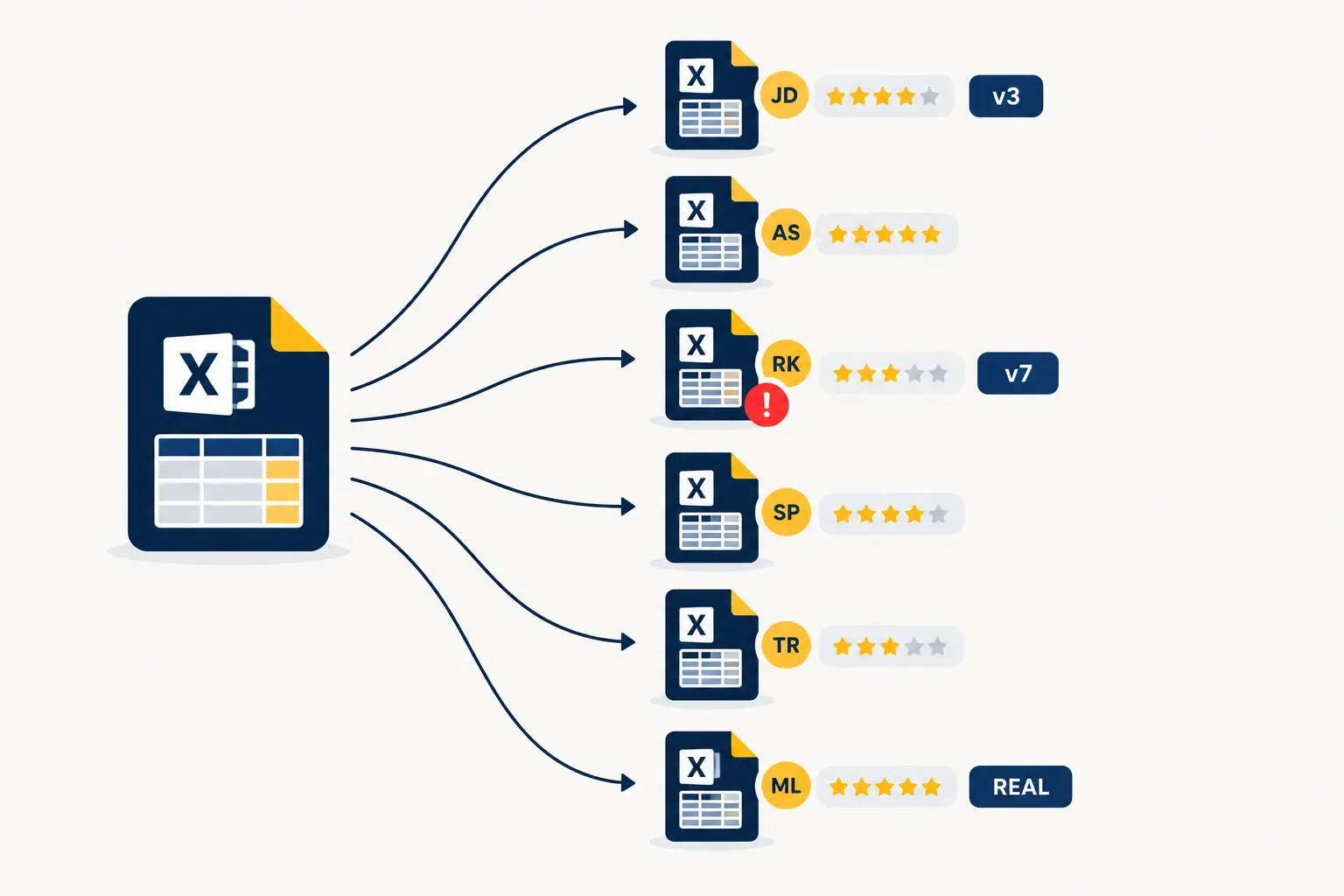
The first failure is quiet. A manager downloads the sheet, fills ratings offline and emails it back. Another manager edits a different copy. HR merges them by hand. Nobody can say which version is final, and a rating changes after sign-off without anyone noticing. Spreadsheet performance reviews depend on trust in a file that has no memory of its own history. When an employee disputes a rating, “the latest file” is not an answer.
Rating inconsistency in Excel appraisals
Excel does not stop a manager from rating everyone a 4, or from treating a five-point scale as if it were three. The rating inconsistency in Excel appraisals stays invisible until calibration, when it arrives all at once. This is the first of the systemic failures I see repeatedly: biased, unwritten verbal feedback that resurfaces as calibration conflict, because nothing was captured in writing during the year. My breakdown of how performance review bias creeps into ratings explains why a spreadsheet cannot flag a pattern it cannot see.
Calibration in Excel limitations
Calibration is where the spreadsheet fails in public. Twelve managers in a room, one projected sheet, filters applied live, and HR in the middle acting as referee. That is the second failure: HR stuck playing referee instead of running a strategic process. The calibration in Excel limitations are structural. There is no pre-calibration view of rating drift, no side-by-side evidence and no record of why a rating moved. My guide to what a good performance calibration process looks like shows the room as it should be.
Spreadsheet data security for employee reviews
A review file holds ratings, compensation signals, improvement plan status and written comments about named people. In a spreadsheet, that data travels as an attachment. It can be forwarded, downloaded to a personal laptop or shared by link with the wrong group. Spreadsheet data security for employee reviews is weak because role-based access, where a manager sees only their team and an employee sees only their own record, is not what Excel or Google Sheets was designed to enforce.
Audit trail for performance reviews
When a rating drives a bonus, a promotion or an exit, you need to show who entered it, who changed it and when. An audit trail for performance reviews is not a nice-to-have in a dispute. Spreadsheet version history is partial, tied to whoever has edit rights, and easy to lose when the file is copied. Software records every change against a user and a timestamp without anyone remembering to do it.
360 feedback in Google Sheets
I see teams try 360 feedback in Google Sheets with a shared form and a summary tab. The problem is anonymity. Whoever owns the sheet can see every response, and everyone knows it, so the feedback turns polite. These limitations of Google Sheets for employee performance tracking are why I point people to how 360 feedback software handles anonymity and how 360 degree feedback compares with the annual review before they build their own.
Goal tracking in Excel vs software
Goals typed into a sheet in April are rarely touched until the review in March. That is the ninth failure: KRAs disconnected from business goals. Goal tracking in Excel vs software is not a question of reminders. It is a question of whether an employee’s goal is linked to something the business is trying to change. The same trap catches company objectives, which I covered in the spreadsheet versus OKR software comparison.
The hidden cost of spreadsheet performance management
Nobody budgets for the spreadsheet because it looks free. The hidden cost of spreadsheet performance management sits in places finance never looks, and spreadsheet based performance management hides it well.
The manual performance review process costs HR time first. HR time spent on manual appraisals goes to chasing late sheets, merging copies, fixing broken formulas and reformatting for the leadership deck. It costs managers time second, because they enter the same data twice. It costs the business third, through disputed ratings, missed development and top performers who were never recognised in time. The manual vs automated performance management question is really about where that time goes: administering the process, or acting on what it shows. See how performance management software reduces manager workload for the other side of that trade.
The cost of managing performance reviews in Excel is easy to measure with your own numbers rather than mine. Use the table below, and read what poor performance management costs a business for the wider picture.
| Cost line | Where it hides | How to measure it |
|---|---|---|
| HR consolidation time | Merging manager sheets, chasing late returns | Hours HR logged in the last cycle, multiplied by loaded cost |
| Manager rework | Entering ratings twice, rewriting comments for calibration | Ask five managers how many hours the cycle took each |
| Calibration conflict | Rating changes with no recorded reason | Count ratings changed after the first draft |
| Disputed outcomes | Employees challenging ratings with no audit trail | Number of escalations and days to resolve each |
| Missed development | Development plans and L&D picks made on gut feel | Share of employees with a development plan updated mid-year |
The most useful moment I have had on this was not in an HR room. In a three-day workshop with 35+ leaders at a listed Indian fintech, I asked every leader to write their goals on sticky notes and stick them on the wall. The managing director walked the wall and found that 80% of the goals were pointed in the wrong direction. Nobody had hidden anything. The organisation simply had no place where all of it could be seen at once. A spreadsheet-run cycle is that wall, except the notes live in forty files and nobody gets to walk it.
See what your performance cycle really costs
Run the Organisation Performance Audit and find out where reviews, goals and development plans are leaking time and signal.
7 signs you have outgrown spreadsheets for performance reviews
When to switch from Excel to performance management software is a question I answer with a count, not a headcount. Every honest take on performance management software vs Excel should end in that count. If three or more of these are true, the spreadsheet already costs you more than the software would.
- HR is the referee in calibration. Every rating conflict lands on HR because there is no written evidence to settle it.
- You cannot name your top and low performers before the cycle opens. HR has zero pre-cycle visibility, so the cycle is where you learn what the year looked like.
- Managers keep their own sheets. If a manager’s private tracker is the real record, the official file is a formality.
- L&D and development plans run on gut feel. What a real employee development plan contains rarely survives a spreadsheet. Plans arrive after the ratings, and training picks follow a manager’s instinct rather than a skills signal.
- Improvement plans live in a side file. When performance improvement plans that should develop people are tracked separately, they become exit paperwork instead of a development tool.
- One-on-ones are optional. If 1:1 notes sit in personal documents, there is no continuous record for the review to draw from.
- Ratings never connect to business goals. You can say who scored a 4, but not whether that person moved anything the company cares about.
Those seven are my shorthand for the systemic failures I see across industries. The one people notice first is usually the first. The one that should worry you is the second. If you cannot see performance before the cycle, you are doing archaeology, not management. That, in short, is why spreadsheet performance reviews fail.
Where does your performance culture really sit?
The Performance Culture Maturity Framework 2026 shows how far your reviews, feedback and accountability have actually travelled.
Performance management software vs Excel at 100, 500 and more employees
Headcount is not the only trigger, but it changes what breaks first.
Performance appraisal in Excel for 100 employees
At this size you have several manager layers, a handful of functions and one HR owner doing the merge. Performance appraisal in Excel for 100 employees still runs, but it runs on one person’s patience. Put that person on leave in March and the cycle stops.
Performance appraisal in Excel for 500 employees
At 500, the spreadsheet is no longer a document. It is a data system without a database. Functions run different scales, calibration happens in layers, and leadership wants cuts by department, tenure and manager that a flat file cannot produce without a week of manual work. This is where performance management software by company size starts to differ in a way you can feel, and where fixing a broken performance management system gets expensive.
Excel vs performance management software for small business
For a small business, the honest answer is that Excel is fine until the first calibration conversation or the first disputed rating. If you are under 25 people, read how performance management works for a small business before you spend anything.
Spreadsheet vs software for performance appraisal India
In India, the pressure shows earlier. I see multi-location teams, forced distribution through the bell curve and appraisal windows where every manager submits in the same week. Spreadsheet vs software for performance appraisal India is not a technology debate. It is a question of whether HR can hold one consistent record when hundreds of ratings arrive together. See employee performance management software in India and performance management software for Indian companies.
| Team size | Excel fit | What breaks first | What I would do |
|---|---|---|---|
| About 25 or fewer | Works | Nothing yet. Habits matter more than tools | Use a clean template and hold regular 1:1s |
| 25 to 100 | Strained | Version control and manager consistency | Standardise rating scales and plan the switch before the next cycle |
| 100 to 500 | Risky | Calibration, access control, audit trail | Move to performance appraisal software |
| 500 and above | Not viable | Reporting, security, cross-functional visibility | Move, with proper change management |
What performance appraisal software replaces, and what it should tell you
Here is the test I use as an OKR Coach: does this platform tell HR whether people are moving the business, or whether they completed the process? A spreadsheet can only answer the second question. Good employee performance tracking software answers the first. That is the deeper gap in HR spreadsheets vs HR software, and it is the core of performance tracking software vs spreadsheet.
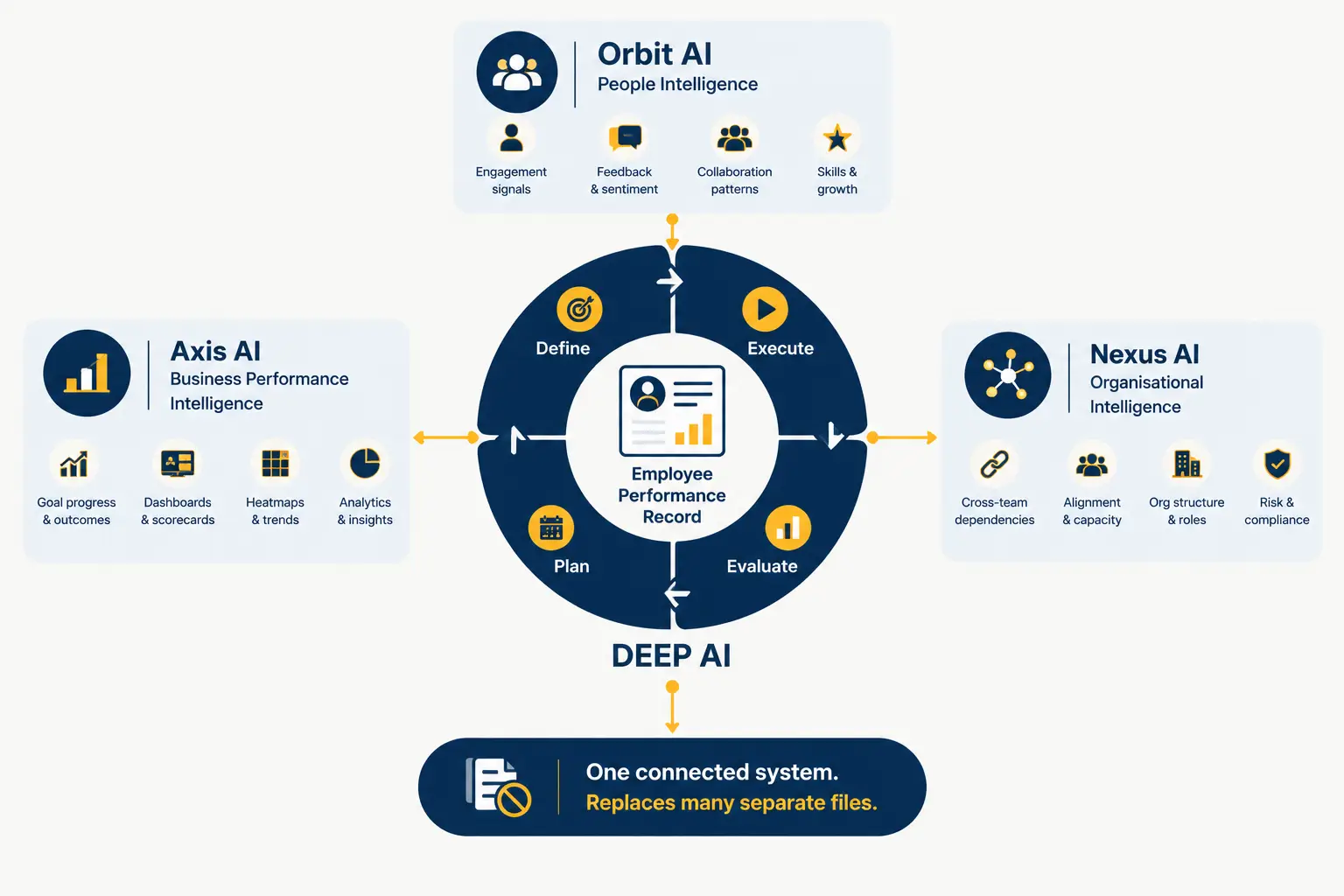
Worxmate is built around that distinction. It runs on three AI models and one framework.
Orbit AI is People Intelligence. It watches six named signals: Burnout Risk, Attrition Trigger, Engagement Decline, Top Performer Flight Risk, Rating Inflation Drift and Skills Decay. In a spreadsheet, each of these stays invisible until it becomes a resignation or an escalation. Orbit also carries what I call the Third Eye Layer, real-time bias monitoring before calibration, so the referee problem is dealt with before the room fills up.
Axis AI is Business Performance Intelligence. It is the structural link I call the PMS-OKR Bridge, connecting individual performance to business goals so a rating means something beyond the process. It is also where the Tiered Accountability Model sits, with OKR weighting of 100%, 40% and 20% by level instead of asking everyone to carry the same load.
Nexus AI is Organisational Intelligence. It answers what HR rarely can: which skills actually move business outcomes, so learning and development follows data, not instinct.
Underneath all three sits DEEP AI™, the framework I built from live implementations: Define, Execute, Evaluate and Plan. Define sets goals against business priorities. Execute keeps check-ins and one-on-ones running as core process. Evaluate turns ratings into evidence-backed retrospectives. Plan carries what you learned, including development plans, into the next cycle. This is performance appraisal software vs manual process in its simplest form: one loop that remembers, against one file that restarts every year.
Where Worxmate is not the right fit: if you have fewer than 25 people and one review a year, you do not need it yet. If all you need is core HR records, your HRIS already does that job. I will say so on a demo call. For the wider decision, my buyer’s guide to performance management software lists the questions to ask any vendor, and the ROI case for performance management software helps you make the argument internally. On the AI side, read how AI makes performance reviews smarter and fairer.
Using AI in reviews without losing fairness
The AI for HR ebook covers how to bring AI into performance conversations while keeping managers accountable for the judgement.
How to move performance reviews from Excel to software
How to move performance reviews from Excel to software is less about data than about sequence. This is the order I follow, and it doubles as my Excel to performance management software checklist.
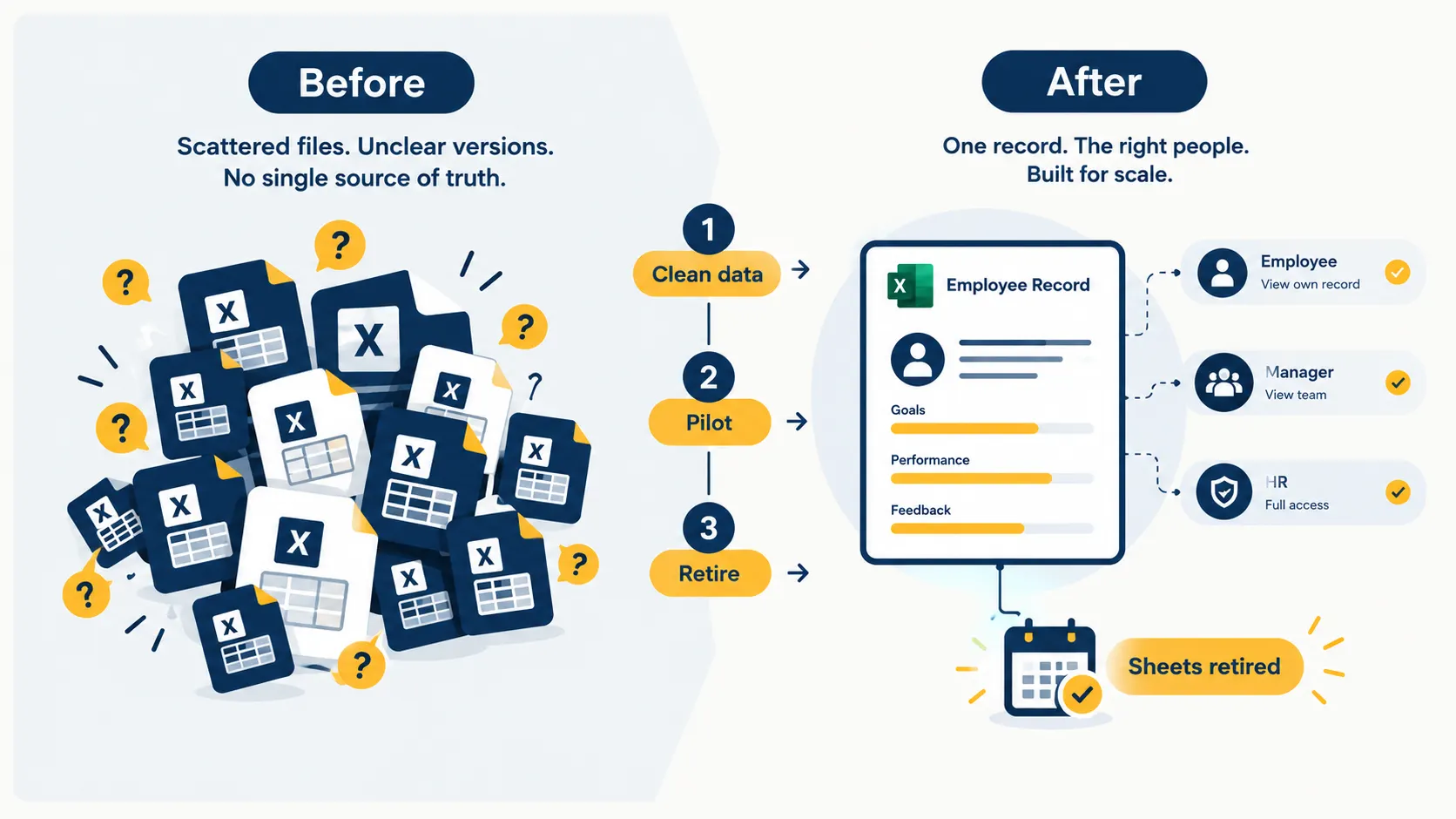
- Freeze the current file and name an owner. One person decides what counts as the record until the switch.
- Clean the data first. Fix employee IDs, manager mapping and rating scales. This is where most of the hard work in how to migrate appraisal data from Excel actually sits.
- Decide what history moves. Migrate the last two cycles of ratings, goals and improvement plan status. Archive the rest.
- Map scales and competencies. If three teams use three scales, agree one before you load anything.
- Pilot with one function. Run a mid-year check-in there, not a full cycle.
- Set access roles. Decide who sees what before anyone logs in.
- Retire the sheets on a stated date. A spreadsheet left open becomes the real record again.
Read how to implement a performance management system for the longer playbook, and the adoption challenges that stall most rollouts. When you compare vendors, a features checklist for performance management software keeps the evaluation honest.
One warning from my OKR implementations that I apply here too. If a team raises 15 to 20 product queries a day in week one, adoption will break within a few weeks. The tool and the team are mismatched, and no customer success call fixes that.
Free Excel performance review template vs software
A free Excel performance review template vs software decision looks like a price question. It is a memory question. A performance appraisal excel template, an employee appraisal spreadsheet and an employee evaluation spreadsheet are all forms. A form captures one moment. An employee performance tracker excel file, or an employee performance tracking spreadsheet built on top of it, tries to stretch that moment across a year, and that is where it fails, because spreadsheets store what someone typed and forget everything else.
If you want a structured starting point, use a performance appraisal form template to sharpen your criteria, then decide whether free performance management tools are enough for your stage. If you are weighing the idea of a performance review spreadsheet vs software, remember that excel vs performance management software is a comparison of a document with a system, and performance management software vs Excel only looks like a feature contest. A template tells people what to write. A system tells HR what is happening.
My Take: what I’d tell a client
Three convictions, stated plainly.
Spreadsheets are not the villain. An Excel performance management system is an honest tool used past its limit. Treat it that way and you will switch at the right time, not in panic. The honest answer to performance management software vs Excel is that both are right, at different stages. The alternative to a once-a-year file is continuous performance management through regular check-ins, and it needs a real performance management culture behind it.
Software does not teach managers to write evidence. In my OKR work, the Execution Maturity Rate, the share of leaders who can write a genuine outcome-driven goal unaided, sits at 5% to 15% in a first cycle and reaches 30% to 40% after twelve months of coaching. Managers learning to write evidence-based ratings follow the same curve. The platform shows the ratings. It does not teach anyone to write them.
Order matters. Fix the habit, then buy the infrastructure, then coach the layer below the C-suite. Skip the coaching and you reach what I call the Coaching Cliff: the programme works at the top and dies one level down.
A spreadsheet records what a manager typed. A system shows HR whether the business moved.
The software is the infrastructure. The coaching is the capability. You need both, and in the right order. That is my whole answer to performance management software vs spreadsheet.
Path 1: The platform. If you are ready to replace the file, look at performance management software, check pricing or book a demo. The aim is a first live cycle in days, not weeks.
Path 2: The consulting. If your real problem is that managers have never been coached on writing ratings or running calibration, start with OKR consulting. The outcome is a manager layer that can run the conversation without HR in the middle.


Written by
An OKR Coach with 20+ years of implementation experience, Madhusudan has guided over 50 organisations through successful OKR transformations, training more than 500 leaders. Learn more about Worxmate.