 WORXMATE
To raise your OKR weekly update rate, make updating collaborative instead of administrative. The OKR weekly update rate is the share of key results with an update in the last seven days. Nine collaboration features move it: co-owned key results, visible dependencies, threaded comments, two-minute check-ins, reminders inside the tools people already use, a team confidence view, a manager-led check-in agenda, team-level visibility of updates, and a response to every update. Pick the ones that match why your teams stopped updating.
Every OKR program that stalls at week six has the same symptom: the board goes quiet.
Nobody announces it. Updates thin out, the status colours stop changing, and a Friday review turns into a team reciting numbers from memory. The software is working. The team has just stopped using it.
In my experience, the instinct is to blame discipline and send a stricter reminder. That treats a collaboration problem as a compliance problem. People update when updating is useful to them and to the people they work with. This guide shows nine OKR collaboration features that make it so, and how to measure the effect with the OKR weekly update rate.
About the author: I am Madhusudan Nayak (Maddy), Co-Founder and CEO of Worxmate. I have spent 20+ years in strategy execution and 10+ years implementing OKRs across 50+ organisations, and I have trained 500+ leaders. What follows comes from watching real check-in habits form and break.
Why Weekly OKR Updates Collapse Even When the Tool Is Fine
I watch for three signals in the first week of any engagement, and they predict update behaviour better than any feature comparison.
Was this pushed, or was this chosen? Where OKRs are announced with a go-live date and a software login, adoption collapses between weeks four and six. Nobody answered the question every employee is silently asking: what is in it for me? A tool does not answer that. Business and HR leaders do, before launch.
How many product queries is the team raising? If a team raises 15 to 20 support queries a day in the first week, adoption will break within weeks. High query volume signals friction beyond the team’s current OKR literacy. A tool and a team that are mismatched do not get fixed by a customer success call.
Does the coaching stop at the C-suite? When it does, the program dies below the leadership layer within a quarter. Middle managers were never equipped to run check-in conversations or surface blockers honestly, so their teams have no reason to update.
Underneath all three sits fear. Leaders worry that an honest red update will be read as poor performance, so they stay quiet. Making explicit from the first session that a missed stretch goal in cycle one is learning, not failure, does more for update rates than any reminder. If you want the wider adoption picture, read how to get your team to actually use OKRs and our guide to inconsistent OKR adoption across teams.
“A weekly update is a conversation you are inviting, not a form you are collecting.”
It helps to be clear about what a good update looks like. It carries a new value, a confidence level that moves when reality moves, and one sentence on what changed or what is in the way. It is written for the people who can help, not for an auditor. When the update is written that way, and someone answers it, the next one gets easier. When it is written to satisfy a deadline, it is skipped the moment the deadline loses its teeth.
The OKR Weekly Update Rate: The One Number to Track First
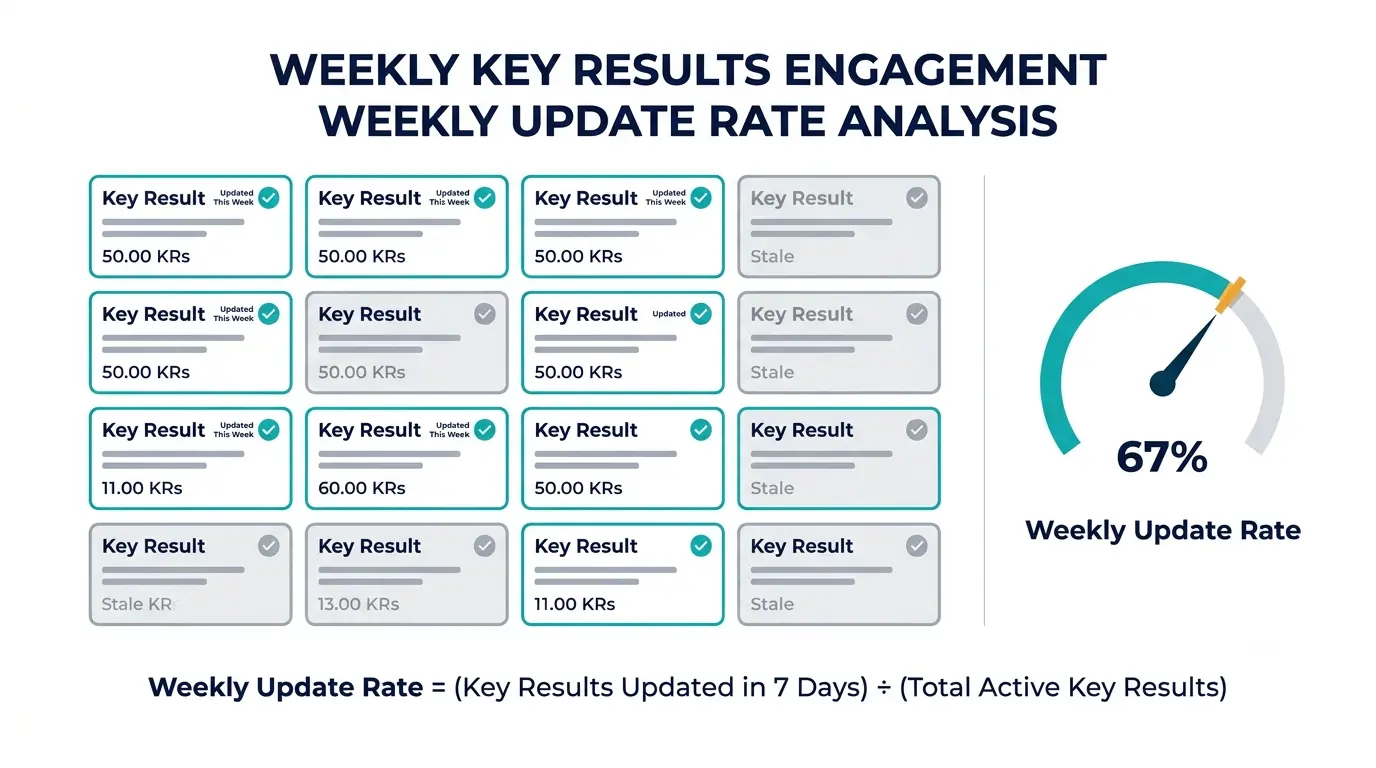
Completion rate is the most visible OKR number and the least useful early on. A better first signal is how many key results were touched this week.
OKR weekly update rate = key results with an update in the last 7 days ÷ total active key results
Stale OKRs show up here first, weeks before they show up in a missed score. Alongside the rate, track a small set of companion measures:
| Measure | How to calculate | What it tells you |
|---|---|---|
| Weekly update rate | Key results updated in 7 days ÷ active key results | Whether the habit exists |
| Response rate | Updates acknowledged within three days ÷ updates | Whether updating feels worth it |
| Blocker age | Days from a blocker being raised to being resolved | Whether collaboration actually unblocks work |
| Honest-status share | Updates where confidence changed ÷ updates | Whether people dare to show amber and red |
| Co-ownership share | Cross-team key results with two owners ÷ cross-team key results | Whether dependencies are shared or ignored |
Set your own baseline in the first four weeks rather than chasing a universal target, and read the rate by team, never as a leaderboard of individuals. Ranking people feeds the fear described above and trains them to update with safe, boring status.
Treat the update rate as a leading signal of capability. In a typical first-cycle implementation, the Execution Maturity Rate, the share of leaders who can write an outcome-driven goal without help, sits between 5% and 15%. In a well-coached organisation after 12 months it reaches 30% to 40%. Update rates follow the same journey. For the mechanics of the check-in itself, see our guide to OKR check-ins, and for a deeper view of health signals see OKR health indicators.
OKR Software for Teams: 9 Collaboration Features That Raise Weekly Update Rates
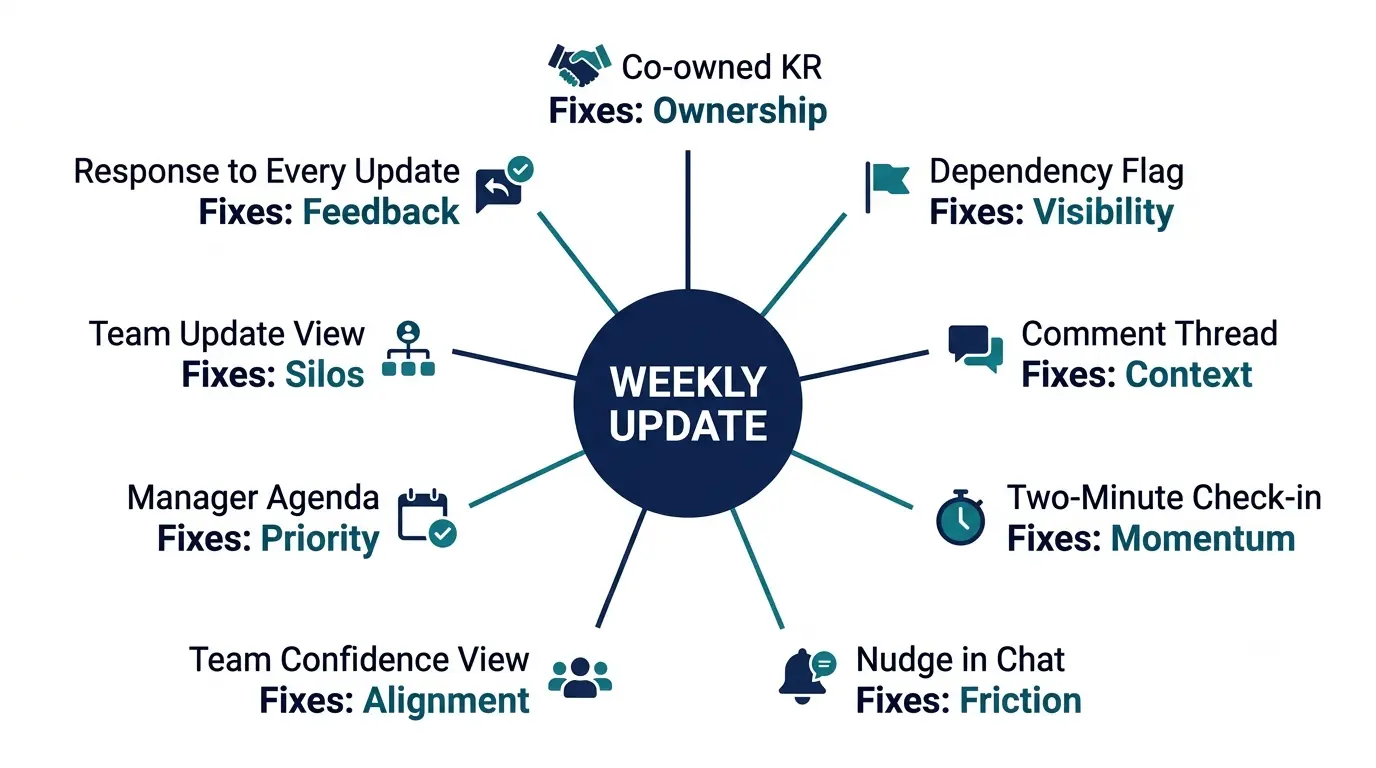
I will describe each of these by what breaks without it, because the feature name alone tells you nothing. The same list is a better filter for your own team than a vendor demo.
1. Co-owned key results
At a European fintech of about 100 people, goals were KPI-led and nobody could say what needed to change. After a chain of “so what?” questions we reached a real outcome. Then I asked the Product Lead to co-own a key result with the Account Executive, jointly accountable for improving the demo experience so it led to conversion. Cross-functional co-ownership had never happened there. It forced a conversation about dependency that had not been had.
Without co-ownership, each function updates its own half and nobody owns the join. With it, two people have a reason to talk before they write the update.
2. Visible dependencies and blockers
In a multi-billion dollar mining engineering group, the unlock was leading indicators: seeing blockers before they became crises, and connecting ground-level daily action to a regional goal. Without visible dependencies, a blocker lives in one person’s head until it becomes a miss. With them, an update becomes the place where help is requested. Our guides to cross-team alignment and cross-functional team alignment go further.
3. Threaded comments on the key result
Without a comment thread on the key result, the discussion moves to chat or email and the update becomes a number with no story. With it, the reasoning stays where the next person will look. People update more when the update can start a conversation instead of ending one.
4. A two-minute check-in
Friction kills updates faster than disinterest. If a check-in needs five clicks and a paragraph, it gets skipped on busy Fridays. A short update should take about two minutes: a new value, a confidence level and one sentence. That is a design target I would hold any tool to.
5. Reminders inside the tools people already use
A reminder that arrives in a separate system gets ignored. Nudges that land in the chat and email people already read raise the update rate because they remove the context switch. See our guide to OKR tools with Microsoft Teams integration and our OKR software integrations page.
6. A team confidence view
Without a shared view of confidence, a manager reads each key result alone and misses the pattern. With it, a manager sees in one glance that three of five key results slipped to amber, and asks the right question on Monday instead of Friday.
7. A manager-led check-in agenda
Updates rise when managers run a short, predictable weekly conversation off the update. Without it, nobody reads what was written. Our OKR check-in meeting template gives the structure. This is where the coaching cliff shows: if coaching stopped at the top, managers have never run this conversation.
8. Team-level visibility of updates
Teams update more when they can see the whole team’s rhythm, not when individuals are named and ranked. Show the team’s rate and the key results that are stale. Keep individual names out of the headline view. The aim is a gentle social norm, not surveillance.
9. A response to every update
The most underrated feature is closing the loop. When a parent owner or manager acknowledges an update within a few days, the next update is easy. When updates vanish into silence, people stop sending them. Response rate is the companion measure I watch most closely.
| # | Collaboration feature | What breaks without it | Measure it moves |
|---|---|---|---|
| 1 | Co-owned key results | Nobody owns the join between teams | Co-ownership share |
| 2 | Visible dependencies and blockers | Blockers surface as misses | Blocker age |
| 3 | Threaded comments | Updates are numbers with no story | Response rate |
| 4 | Two-minute check-in | Busy weeks skip updates | Weekly update rate |
| 5 | Reminders in existing tools | Nudges are ignored | Weekly update rate |
| 6 | Team confidence view | Managers miss patterns | Honest-status share |
| 7 | Manager-led check-in agenda | Updates are written and never read | Response rate |
| 8 | Team-level update visibility | No social norm forms | Weekly update rate |
| 9 | Response to every update | Silence trains people to stop | Response rate |
Low update rates: a tool problem or a capability problem?
The OKR execution maturity framework shows whether your leaders can run the check-in conversations that make updating worth it.
Why Teams Stop Updating OKRs: From Symptom to Fix
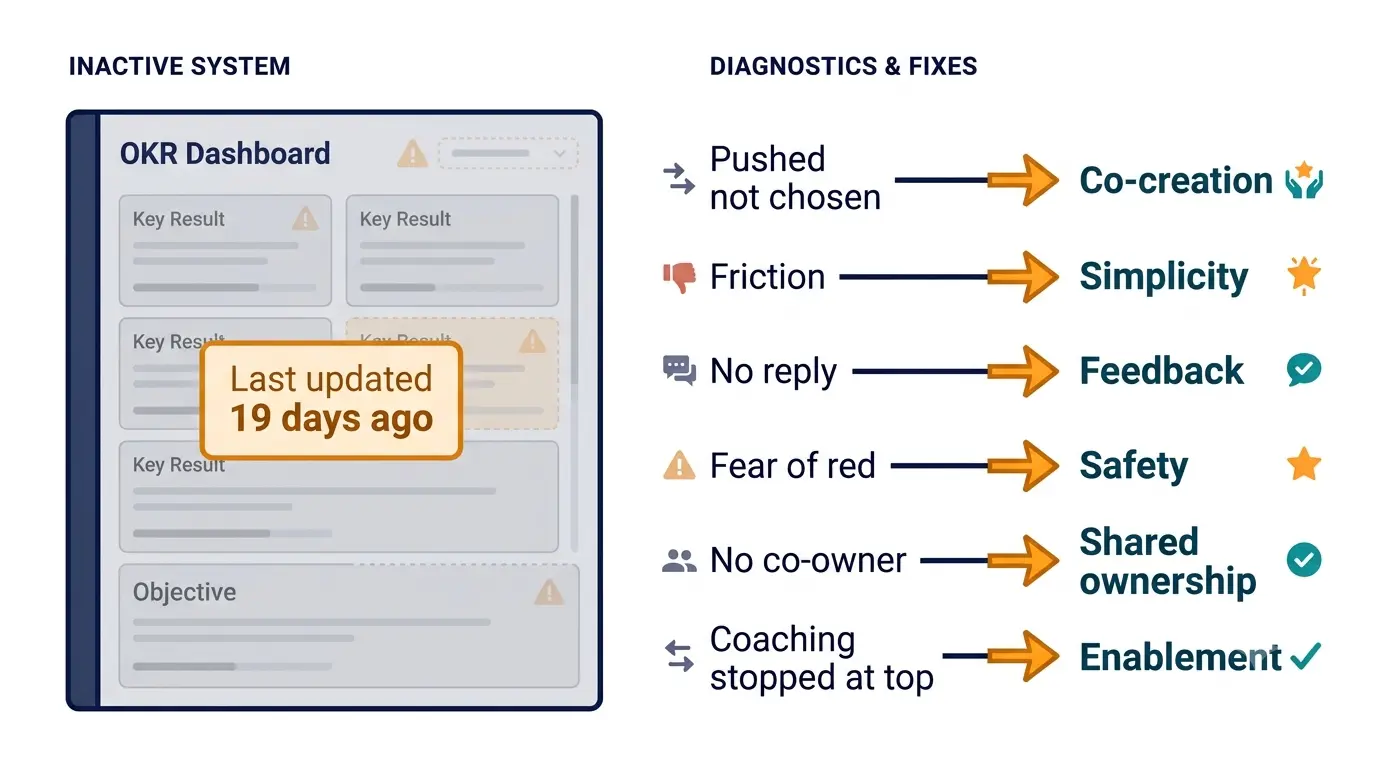
Before you buy or switch anything, diagnose. The same low update rate has different causes, and each points to a different fix. Our OKR software features guide covers the capability checklist. This table covers the behaviour.
| What you see | Likely cause | Where to start |
|---|---|---|
| Updates stop around week four to six | The program was pushed, not chosen | Re-run the “what is in it for me” conversation with leaders |
| Updates are late and rushed on Fridays | Check-in friction | Shorten the update and move reminders into existing tools |
| Updates exist but nobody replies | No closed loop | Set a response expectation for managers |
| Everything stays green | Fear of showing red | Reset the contract: missed stretch goals are learning |
| One team updates, its dependency does not | No co-ownership | Convert the dependency into a co-owned key result |
| Managers do not read updates | Coaching stopped at the top | Coach managers on the weekly check-in conversation |
Notice how few of these are software problems. A stalled board is rarely fixed by a new platform. If you are asking why OKR programs stall more broadly, see why OKRs fail.
Launching or relaunching OKRs?
Our strategic OKR implementation guide covers the sequencing and coaching that make weekly updates stick from the first cycle.
How to Increase OKR Check-In Participation: A Four-Week Plan
You do not need a program relaunch to raise participation. You need four weeks and one team.
Week one: measure. Learn how to track OKR update rate before you change anything. Pull last month’s updates, calculate the rate for each team and note which key results went stale first. That is your baseline.
Week two: remove friction. Learn how to make OKR check-ins faster by cutting every field nobody reads. OKR check-in friction is the quiet killer, and OKR update fatigue sets in when people write long updates that nobody answers. A new value, a confidence level and one sentence is enough.
Week three: close the loop. Ask each manager to reply to every update within three days. It is the cheapest change on the list, and it is how to get teams to update OKRs weekly without nagging.
Week four: share the joins. Look at cross-team work and decide who should own a key result. Where a dependency has no single owner, convert it into shared key results with two named owners, and use OKR dependency mapping so everyone can see how the work connects. Wondering how to handle cross-team OKR dependencies in a larger organisation? Start the same way, one dependency at a time.
Re-measure at the end of week four. If the rate has not moved but the response rate has, give it another cycle, because habits lag behaviour. And if you want to know what is a good OKR update rate, the answer is the one you can hold past week six with honest status, not the one that looks best in week one.
How to Run Weekly OKR Check-Ins Without Adding Another Meeting
Weekly OKR updates do not need a meeting of their own. For remote teams, async OKR check-ins work well: each owner posts the update, comments run in the thread, and a 15-minute conversation covers only what is amber or red. That fits the pattern in OKR tracking for remote teams and OKR software for hybrid teams.
For small teams the same approach works with less ceremony. See OKR software for small teams and our guide to weekly goals. If your team already runs a weekly plan, fold the check-in into it, as described in OKR software with weekly planning.
A good weekly cadence has a rhythm. Updates by Thursday, comments through Friday, a short manager conversation on Monday. Watch the response rate in particular. If managers reply within three days, the update rate usually rises without any extra nagging. For a deeper view of how teams track progress day to day, see team OKR tracking.
Achieve Your Goals Faster
See how Worxmate can help your team set clear goals and achieve faster results. Book your free demo today and experience the power of AI-driven OKRs in action.
Questions Teams Ask About Update Behaviour
OKR reminder best practices
OKR reminder best practices come down to placement and tone. OKR check-in reminders and OKR update reminders work when they arrive where people already work, which is why Slack OKR updates and Microsoft Teams OKR updates happen far more often than updates that need a separate login. Keep OKR nudges short, send them once and never use them to shame individuals. Reminders are the last fix, not the first.
How to keep OKRs from going stale
How to keep OKRs from going stale: agree an OKR update frequency (weekly for most key results), read the OKR status updates in a short manager conversation, and make sure any change in the OKR confidence score gets a response. What to do when nobody updates OKRs? Do not escalate. Diagnose with the symptom table above, fix the cause, and relaunch the habit with one team first.
OKR collaboration for remote teams
OKR collaboration for remote teams depends on async habits. Async OKR check-ins for remote teams are the default: owners post, comments run in the thread and a short live conversation covers only what is amber or red. The OKR collaboration features that matter most here are the comment thread, the visible blocker and the response to each update. Together they deliver OKR team collaboration without more meetings and make collaborative OKR tracking workable across time zones.
OKR dependencies, blockers and cross-functional OKRs
OKR dependencies and OKR blockers are where weekly updates earn their keep. How to surface blockers in OKRs: ask for them in the update, tag the team that can clear them and track how long each stays open. For cross-functional OKRs, a visible blocker with a named owner beats another status meeting.
Engagement, accountability and adoption
OKR engagement rises when updating feels useful, and OKR accountability stays healthy when it is shared rather than individual. Our article on OKRs and employee engagement goes deeper. To raise OKR update rate sustainably, look for OKR software features that improve adoption, such as fast check-ins and nudges inside existing tools, rather than a long feature list.
Choosing OKR Software Without Buying a Feature List
When you evaluate any platform, test behaviour, not breadth. Run a two-week pilot with one real team and watch three things: how many support queries the team raises, whether the update rate holds past week four, and whether managers reply to updates. Our guide on how to evaluate OKR software goes through a fuller process, and cross-team collaboration tools compares the wider tooling.
I will say one thing plainly. The software is the infrastructure and the coaching is the capability. A platform can make two-minute check-ins and nudges possible, but it cannot make a manager reply or make a leader safe enough to write an honest red. If you are still selecting a platform, our comparison of OKR software covers that decision on its own.
Where DEEP AI Fits: Execute Does the Heavy Lifting
DEEP AI™ (Define, Execute, Evaluate, Plan) maps neatly onto update behaviour. Define makes sure the goals worth updating are outcomes, not outputs, and Define catches weak ones before the cycle starts. Execute is where updates live: Execute is what keeps check-ins honest and surfaces at-risk key results before the end of the quarter. Evaluate and Plan turn the quarter’s update history into learning for the next cycle, through Evaluate and Plan.
Three intelligence layers sit around that. Axis AI shows where business performance is drifting from plan, Orbit AI shows which leaders and managers need coaching so check-in conversations improve, and Nexus AI shows patterns across teams, such as where updates go quiet. Without that visibility, a low update rate is a mystery you solve by guessing.
Do people feel safe showing an honest red?
The performance culture maturity framework shows whether your culture rewards learning or only green updates.
Bottom Line: Update Rates Follow Collaboration
Do not start with a reminder. Start with a question: what would make a weekly update worth ten minutes of a busy person’s week? Co-ownership, a reply, a visible blocker getting cleared. Build those, measure the weekly update rate by team, and fix the lowest cause first.
The software is the infrastructure. The coaching is the capability. You need both, and in the right order.
Path 1: the platform. To see check-ins, comments and nudges working together, explore Worxmate OKR software, look at pricing or book a demo.
Path 2: the consulting. If your honest diagnosis is that managers have never run a check-in conversation, our OKR consulting is built to coach them through real cycles.


Written by
An OKR Coach with 20+ years of implementation experience, Madhusudan has guided over 50 organisations through successful OKR transformations, training more than 500 leaders. Learn more about Worxmate.